

Details
Issue:
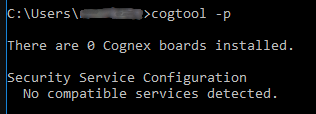
The license was working in VisionPro 9.2, but after downgrading to VisionPro 9.1 the license is not recognized, although Cognex Security Service is running. The Cogtool printout gives a message that "No compatible services detected":
Causes:
The Cognex Security Service might be left over from the previous VisionPro installation and might not be compatible with the VisionPro 9.1 version.
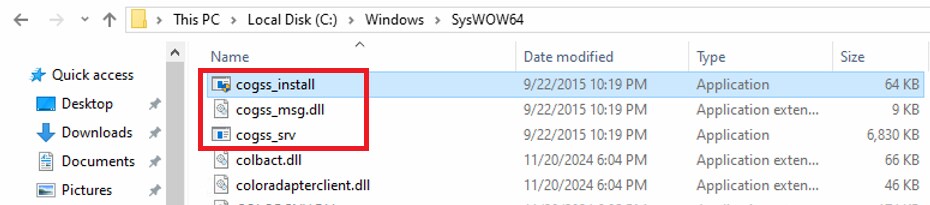
To check this, navigate to the folder C:\Windows\SysWOW64\ and find the below files there:
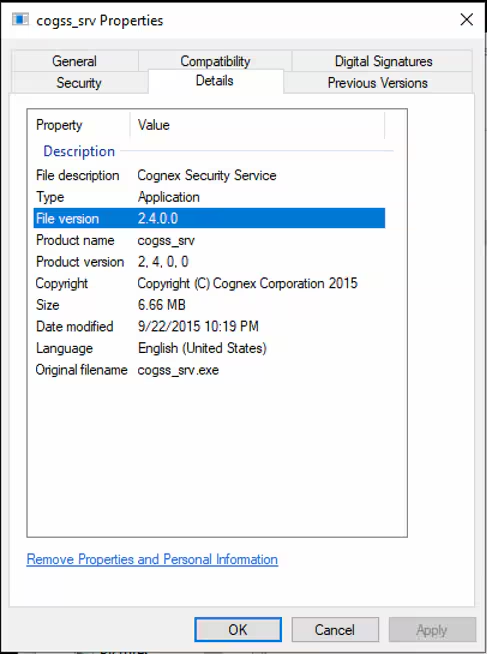
Right-click on cogss_srv, select Properties, then click on the Details tab. If you see a File version other than 2.4.0.0, then the issue is related to the incompatible Cognex Security Service version.
Resolution:
- Uninstall Cognex VisionPro
- Open Command Prompt as an administrator, navigate to the C:\Windows\SysWOW64\ folder and execute the below:
cogss_srv -remove Open File Explorer and navigate to the C:\Windows\SysWOW64\ folder and delete the below files from there:
- cogss_install.exe
- cogss_msg.dll
- cogss_srv.exe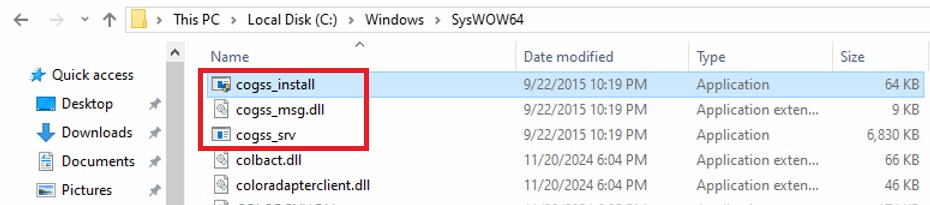
- Uninstall Cognex x64 Drivers
- Reboot the computer
- Install Cognex VisionPro 9.1
