Question
EAN-13 codes beginning with 0 are actually 12-digit UPC codes with prepended 0 digit. In recent years, more products sold by retailers outside the United States and Canada have been using EAN-13 codes beginning with 0, since they were generated by GS1-US.
Answer
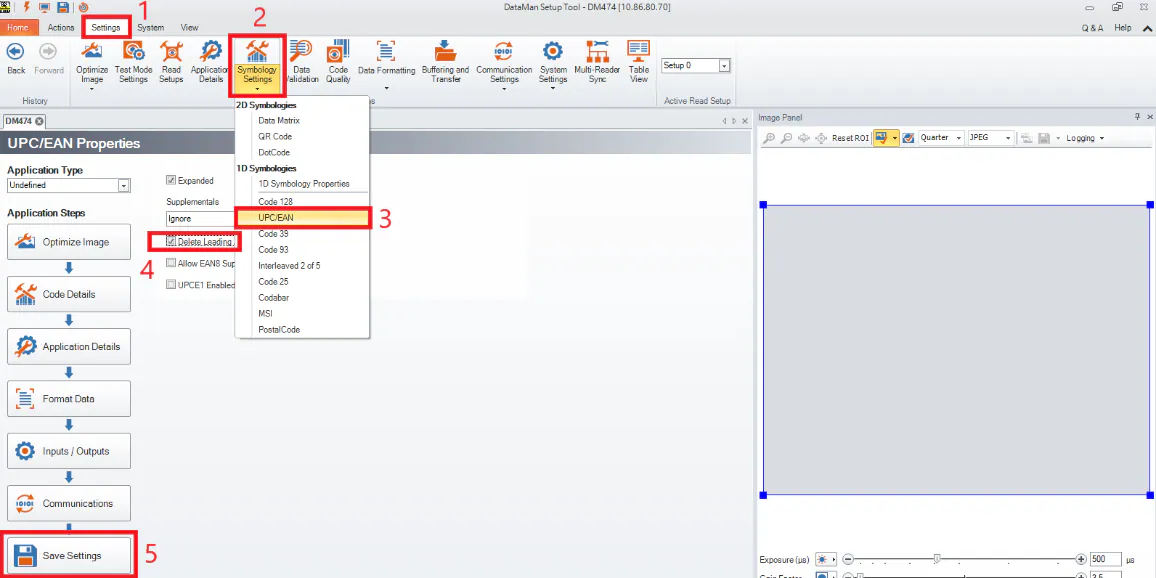
To delete leading zero for UPC/EAN codes, do the following steps after connecting to the reader:
- Navigate to Settings
- Select the dropdown arrow under Symbology Settings
- Select UPC/EAN
- Select the checkbox „Delete leading zero”
- Hit Save Settings
If you have a master slave configuration, repeat steps 1-5 for all readers in the group.