

Details
Issue:
SEMI M13 double-dot OCR font reading may fail.
Probable Causes:
- Small characters (SEMI M13 specifications) are most often marked with single dot density character strokes, but some laser markers use double dot densities to mark smaller characters.
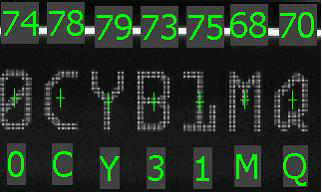
If double dot-density strokes are used for characters of smaller M13 specs, there are gray pixels between character strokes where the black and white of the dots are not properly separated and there is a middle color of gray pixels, so the reading algorithm can misinterpret these as extraneous stroke candidates. In these situations, there is a high probability of misreading, as in the example below.
Solution:
- The solution is to blur the image to make the character strokes look more uniform, as shown below.
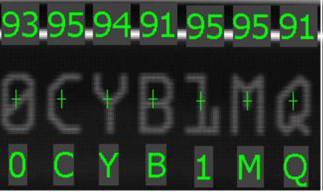
- The only way to achieve this on Wafer ID cameras running firmware before Ver3.4.4 is to manually slightly blur the reader's focus.
- With Ver4.2.x and later firmware versions, the low-pass filter function has been added to blur images more effectively.
- Note :
With Wafer ID cameras, SEMI M12 characters with a larger font size do not read incorrectly even if they are double-dot-density characters. This is mainly due to the fact that the double dot density problem has less impact on large characters than small ones, as the extraneous dots are not seen as stroke candidates.
