

Details
Issue:
The Device does not show up in the In-Sight Vision Suite Network Tab.
Cause:
- There could be several causes:
- No In-Sight EasyBuilder Adapter installed.
- Firewall blocking the connection.
- No Admin Rights for the user.
- Network Ports are used by another application on the PC.
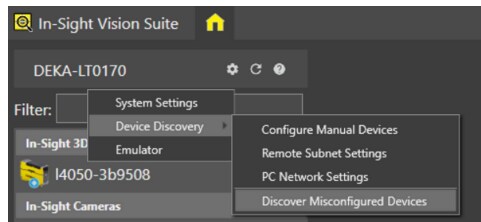
- Option “Discover Misconfigured Devices” not used.
Resolution:
Please make sure:
- The latest In-Sight EasyBuilder Adapter is installed.
- Firewall is not blocking the connection.
- Current users have Admin Rights.
- Network Ports are not used by another application on the PC.
- Option “Discover Misconfigured Devices” is checked.
