

Details
After connecting to the reader from a TCP/IP Client or connecting from the reader to a TCP/IP Server, the reader will resend the last decoded string to the TCP/IP Client or Server after the specified time. To achieve this, use the below Data Formatting and Communication scripts on the device.
Data Formatting Script
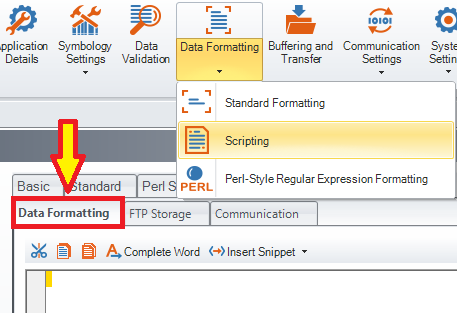
Reset Configuration of the device and enable Script-Based Formatting, then copy and paste the below code into the Data Formatting Script, overwriting any existing code there:
"use strict";
var last_result = "";
function onResult (decodeResults, readerProperties, output) {
last_result = decodeResults[0].decoded ? decodeResults[0].content + "\r\n" : "";
output.content = last_result;
}
Communication Script
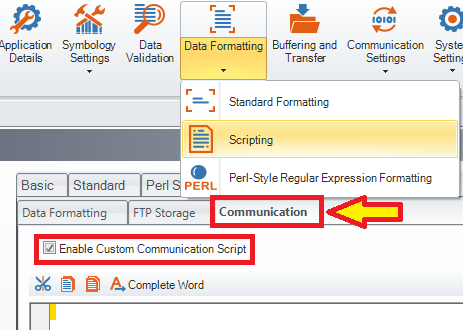
Enable Custom Communication Script, then copy and paste the below code into the Communication Script, overwriting any existing code there:
"use strict";
const delay_sec = 4; // delay in seconds
function CommHandler()
{
return {
onConnect: function (peerName)
{
this.ontrigger = registerHandler(Callback.onTrigger,this.onTrigger.bind(this));
return true;
},
onDisconnect: function () {
deregisterHandler(this.ontrigger);
},
onTrigger: function (trigger, state) {
if (state) this.setTimer(delay_sec);
},
onTimer: function () {
this.send(last_result);
}
};
}
