

Details
When Network Client is enabled on the DataMan device (to send data from the reader to a TCP/IP Server) and the reader tries to send data while the Server is down, then the result data will be stored in a buffer, and it will be sent automatically when the Server becomes available.
The below solution checks if the reader is connected to the TCP/IP Server or not, and it generates output only if the connection to the Server is established.
Data Formatting Script
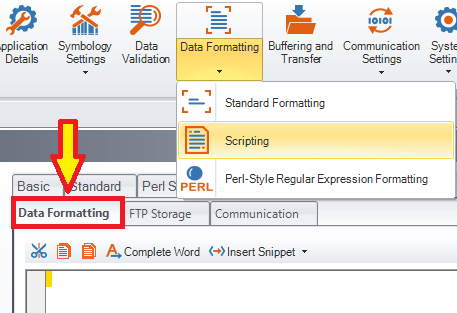
Reset Configuration of the device and enable Script-Based Formatting, then copy and paste the below code into the Data Formatting Script, overwriting any existing code there:
const SERVER_PORT = ":1000"; // this has to be set to the same port as the server Port in the Network Client settings, and it must be given as a string
var outputEnable = 0;
function onResult (decodeResults, readerProperties, output) {
if (decodeResults[0].decoded) {
if (outputEnable) {
output.content = decodeResults[0].content + "\r\n";
}
else {
output.content = "";
}
}
}
Communication Script
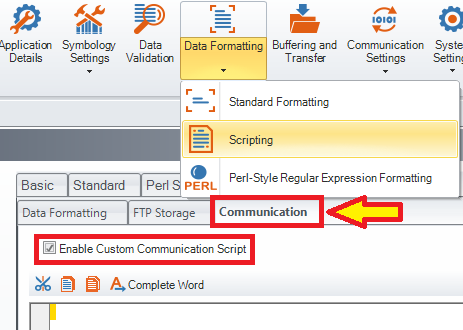
Enable Custom Communication Script, then copy and paste the below code into the Communication Script, overwriting any existing code there:
var comm_handler = new Array(0);
function CommHandler()
{
return {
onConnect: function (peerName) {
if (!peerName.substr(-SERVER_PORT.length).localeCompare(SERVER_PORT)) {
comm_handler.push(this); // only the server connection can be stored in the "comm_handler" array
outputEnable = 1;
}
return true;
},
onDisconnect: function () {
var index = comm_handler.indexOf(this);
if (index > -1) {
comm_handler.splice(index,1);
}
if (!comm_handler.length) { // if the length of the "comm_handler" array is 0, it means that the connection to the server is down
outputEnable = 0;
}
},
onError: function (errorMsg) {
},
onExpectedData: function (inputString) {
return true;
},
onUnexpectedData: function (inputString) {
return true;
},
onTimer: function () {
},
onEncoder: function () {
}
};
}
