

Details
Step 1: Start In-Sight Vision Suite.
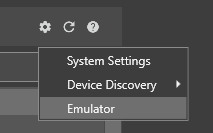
Step 2: From the Home Screen, click on the Settings Gear, and choose Emulator from the dropdown list.
Step 3: In the Emulator Configuration dialog box, select a model you want to emulate.
Step 4: The Registration section will appear if you choose a supported model (In-Sight 2800 or In-Sight 3800 models).
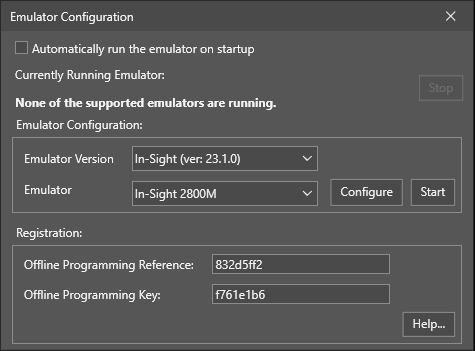
Step 5: On this page, copy the Offline Programming Reference string into the text box labeled "Offline Programming Reference." Then, press the "Generate Key" button to generate the unlocking Offline Programming Key.
Step 6: In the In-Sight Vision Suite dialog box, enter the generated Offline Programming Key in the box labeled "Offline Programming Key". Apply the change, then close the Options dialog box.
In-Sight Key Generator
Cognex 비전 시스템의 등록된 사용자로서, 최소 하나의 In-Sight 시스템이 PC와 동일한 네트워크에 있는 한, 시간 제한 없이 하나 이상의 PC에 In-Sight Explorer 및/또는 In-Sight Vision Suite 소프트웨어를 설치하고 실행할 수 있습니다.
