Question
How do I see the user interface of the DataMan Setup Tool in a language other than the default English language?
Answer
Some versions of the DataMan Setup Tool can display its user interface in different languages.
To change the language, if your DataMan Setup Tool version is released later than 5.7.7_sr5 follow step 1 through 5. For earlier versions jump to step 6.
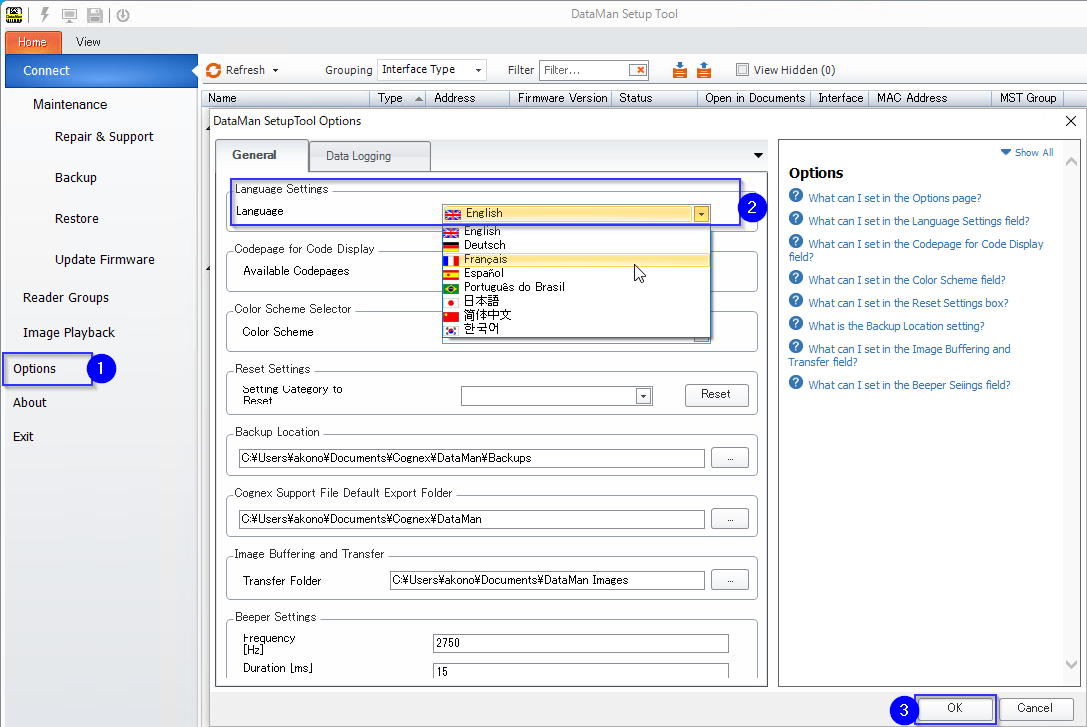
- Click “Options” in the left pane of DataMan Setup Tool
- Click the pull-down list for Language and select the language you would like to use. If this section does not show, then the version of Setup Tool being used is English Only. Download a different version of the DataMan Setup Tool that supports other languages at the following URL:
https://support.cognex.com/en/downloads/dataman/software-firmware Press “OK” at the bottom right of the Option Window.
To apply the change press “OK” to close the dialog box shown below and exit the DataMan Setup Tool application.
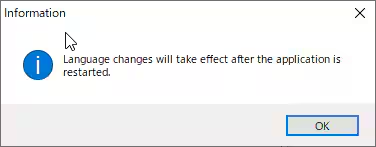
- The DataMan Setup Tool will now show the selected language the next time it is opened.
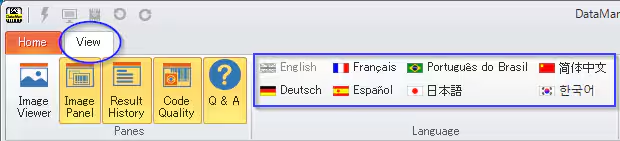
If your DataMan Setup tool was released prior to 5.7.7_sr5 click “View” tab and select the flag of the language you would like to use. This will change the interface immediately. If this section does not show, please see step 2.