Details
OPC UA Server under Designer
The OPC UA feature is only available if the optional OPC UA Server plugin has been selected for installation in the Cognex Designer setup.
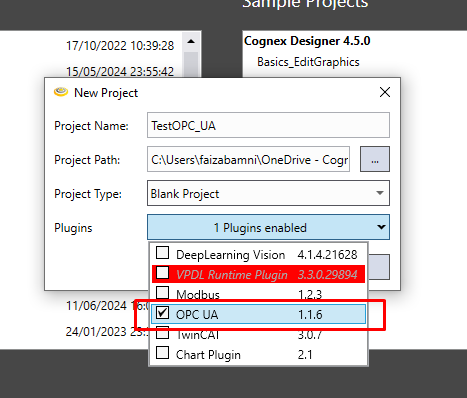
Perform the following steps to configure an OPC UA Server device :
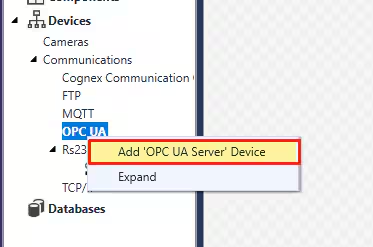
- In the Project Explorer, search for the Devices > Communications > OPC UA node
- Right-click the OPC UA node, and then left-click Add 'OPC UA Server' Device
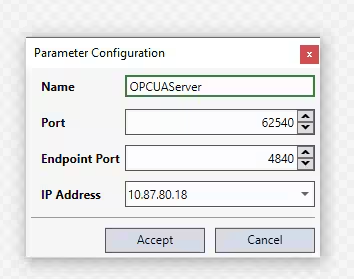
- The Parameter Configuration dialog appears. Fill the available properties as applicable.
| Property | Description |
| Name | The user-specified name used to reference the server device in the Cognex Designer project. |
| Port | Specifies the port to be used as the base address of the OPC UA server device. OPC UA client applications will communicate with the OPC UA server device through this port. |
| Endpoint port | Specifies the endpoint URL, used by the OPC UA Discovery Server on the network. Configure this property if Cognex Designer is running on a machine with multiple OPC UA servers. |
Note : Cognex Designer supports only one OPC UA Server device per project.
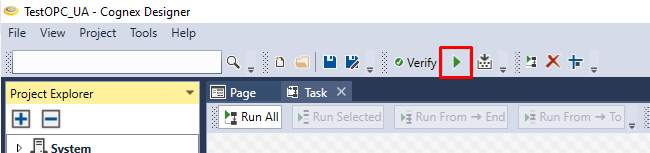
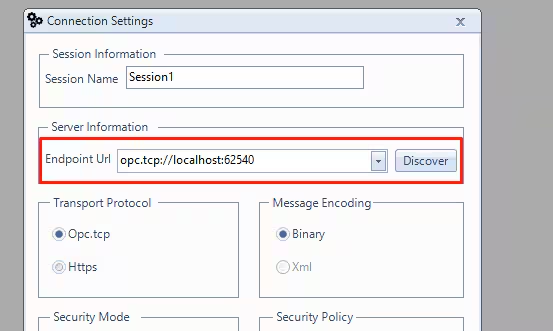
You can connect to the OPC UA Server device with a OPC UA client while the project is under development. For this, you will need to provide the endpoint URL of your OPC server, formatted as follows : opc.tcp://localhost:62540.