

Details
Issue:
The report print function does not work, and PDF reports do not show on the report tab after verification.
Causes:
A recent update to Windows 10 affected the report printing functionality which is done using the Adobe Reader DLL.
Resolution:
The resolve the issue do the following:
- Open Adobe Reader and go to Edit->Preferences
- Select the Security (Enhanced) tab
Uncheck “Enable Protected Mode at Startup”
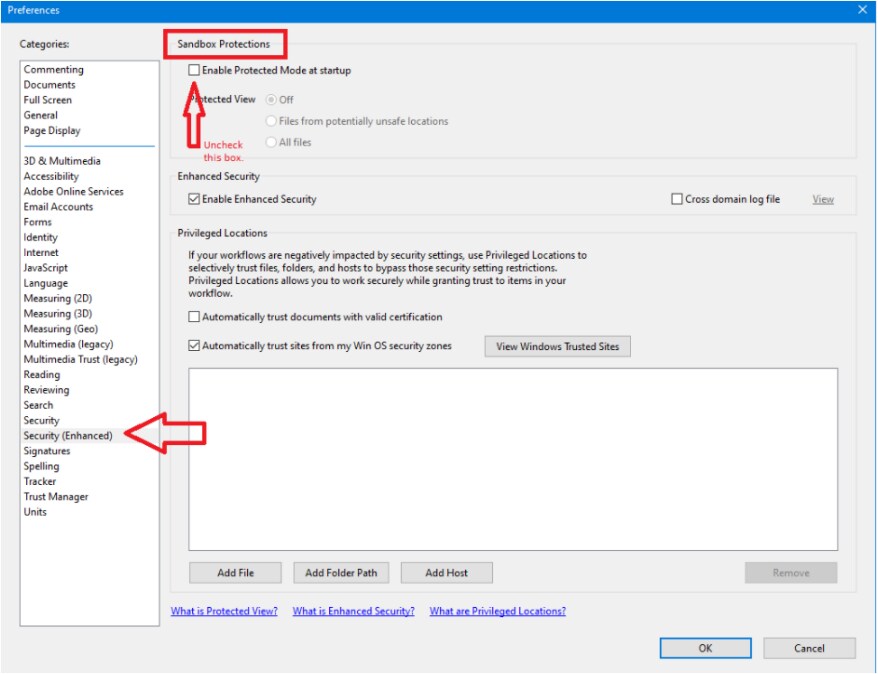
- Save and close Adobe reader
- Then restart TruCheck and it should get a fresh copy of the Adobe Reader DLL and then be able to print.
NOTE - It is critical that Adobe Reader is not open with any other documents because then the changes to the settings will not get saved. It may be best to restart the system and check Adobe to see if the changes remain.
