

Details
Starting in In-Sight Explorer 5.7.3, there is a configuration item to allow the user to manually override the emulator model. This will NOT work with 4.x emulators (In-Sight Gen1 models).
Here are the steps to enable the feature:
Note: Because the config file is located under "Program Files", you need administrator access to save the file. The easiest way to do this is to start your favorite text editor in administrative mode, and then open the config file:
- Close In-Sight Explorer if it currently runs.
- Click on the Windows button then type "Notepad", right-click on the Notepad application, and select "Run as administrator".
- Open In-Sight Explorer software's config file in the previously launched Notepad. For example, in the case of In-Sight Explorer 6.5.1, it is located at
C:\Program Files (x86)\Cognex\In-Sight\In-Sight Explorer 6.5.1\In-Sight Explorer.exe.config Find the line with "EnableEmulatorModelOverride" and change the value "false" to "true":
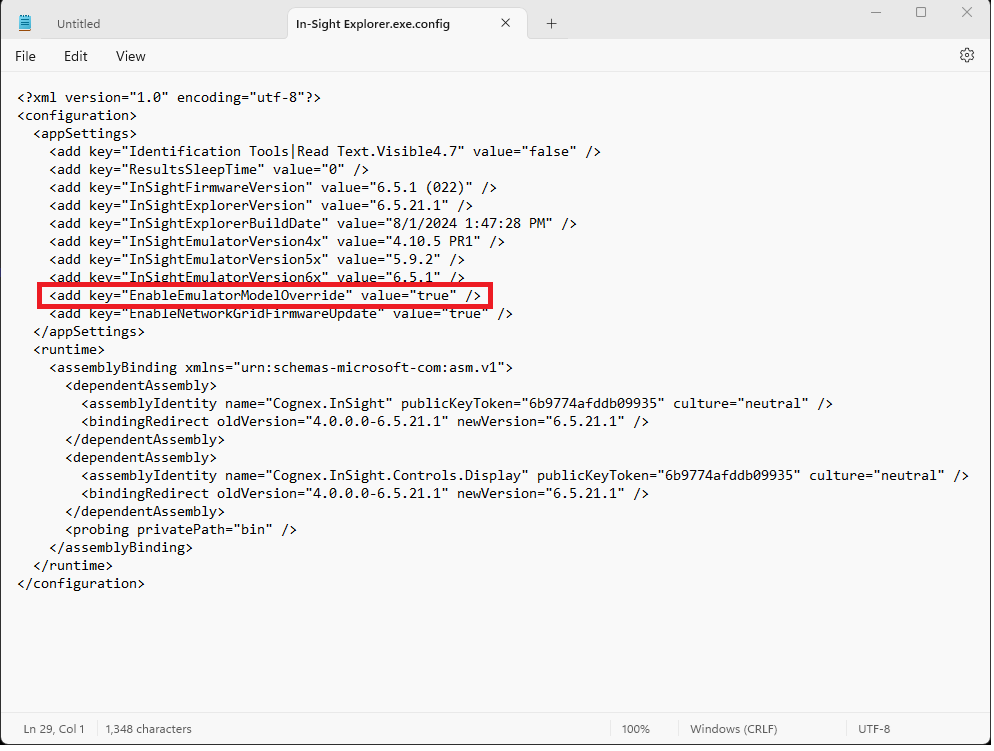
- Save the file.
Then, you can try to enable a hidden emulator in the following way:
- Launch In-Sight Explorer.
- Open the Options dialog from the System menu, and select Emulation.
- Enable the "Model Override" option and type the model you would like to emulate, then click on the OK button:
Note: The difficulty is knowing what to put into the Model Override box. If you enter a string that doesn't match an allowed emulator, the emulator will show up as "Standard".
- For cameras that only have one resolution, the model name is all you need. Examples: is7501, is7501c, is2000m-120, is2001m-353
- For cameras with multiple resolutions, the resolution is added at the end of the model. Examples: is7500_640x480, is7600c_800x600, is2000c-130_800x600
