

Question
My Webscan device is locked and I lost the password; how can I reset it?
Answer
Note: The default password as shipped from factory is "user", so it is worth trying this first.
There are two options for resetting the password. Both options involve resetting the Webscan back to factory defaults. Neither option will allow any settings on the Webscan device to be retained.
The first option is to uninstall and reinstall the software. Use the link below to access the page where the latest TruCheck software can be downloaded:
Webscan TruCheck Software for USB-connected devices
After the software is installed, the latest manual can be accessed from the below path:
C:\Program Files (x86)\Webscan Inc\TruCheck\Webscan TruCheck User Manual.pdf
- To reset a Webscan device back to defaults without having to uninstall the software, follow the steps below. The PC will need to be logged into an account with admin rights in order to perform these steps:
- Right-click the desktop icon used to open the TruCheck application and choose Copy. Then right click the Windows desktop and choose Paste to create a copy of the shortcut.
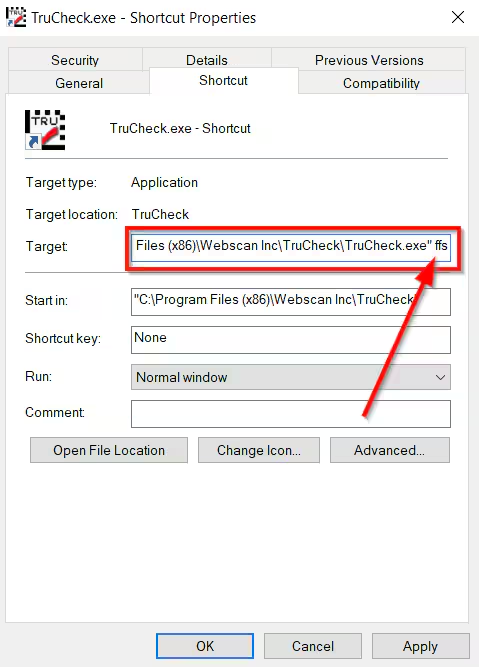
- Right-click the copied shortcut and go to Properties.
Go to the end of the Target text box and add a space, then type "ffs". It should look like below:
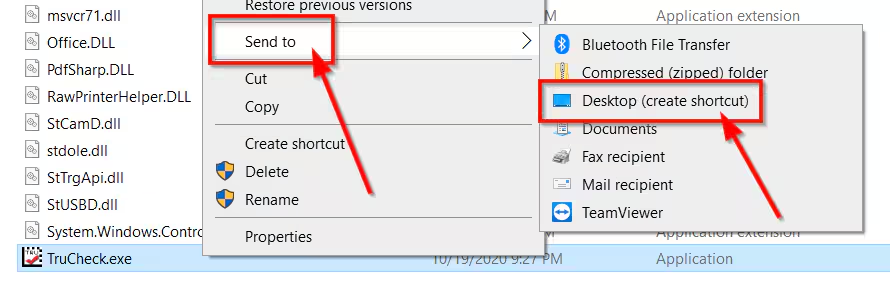
NOTE: If the Target is grayed out and you cannot edit the line navigate to the EXE file - C:\Program Files (x86)\Webscan Inc\TruCheck\TruCheck.exe - right click TruCheck.exe and choose Send to - then Desktop (create a shortcut). Use the shortcut created on the desktop to add ffs.
- Click OK
- Run the program using this copied shortcut.
- Once TruCheck has opened immediately close out of the program.
- Delete the copied shortcut from desktop and start the program again with the original shortcut.
- Now the Webscan device has been reset back to factory defaults. This will have reset the user password.
