

Details
If you need to activate a single Read Setup on the DataMan reader and then trigger the device with that selected setup over TCP/IP, then this sample script provides a possible solution. It uses a custom command to select the Read Setup and then trigger the reader:
READ xx<CR><LF>
(xx is the Read Setup ID between 0..15, either 1 or 2 digits, and <CR><LF> are the CarriageReturn and LineFeed control characters).
Communication Script
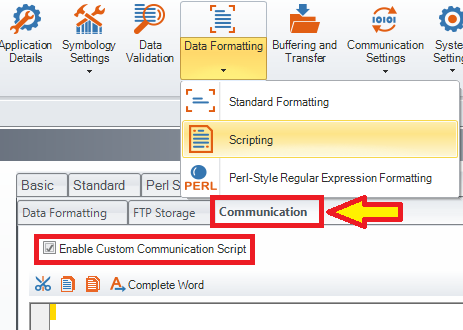
Reset Configuration of the device and Enable Custom Communication Script, then copy and paste the below code into the Communication Script, overwriting any existing code there:
const MAX_NUM_OF_SETUPS = 16;
const CMD_HEADER = "READ "
const CMD_TERMINATOR = "\r\n"
function CommHandler() {
return {
onConnect: function (peerName) {
this.expectFramed(CMD_HEADER, CMD_TERMINATOR, 2);
// this.send(peerName + " is connected.\r\n");
return true;
},
onDisconnect: function () {
},
onError: function (errorMsg) {
// this.send("ERROR: " + errorMsg + "\r\n");
},
onExpectedData: function (inputString) {
var selectedSetup = parseInt(inputString,10);
if (selectedSetup < MAX_NUM_OF_SETUPS) {
dmccSet("SETUP.PROG-TARGET", selectedSetup);
dmccSet("SETUP.ENABLE", "ON");
for (var i=0; i<MAX_NUM_OF_SETUPS; i++) {
if (i != selectedSetup) {
dmccSet("SETUP.PROG-TARGET", i);
dmccSet("SETUP.ENABLE", "OFF");
}
}
dmccCommand("TRIGGER", true);
}
this.expectFramed(CMD_HEADER, CMD_TERMINATOR, 2);
return true;
},
onUnexpectedData: function (inputString) {
this.expectFramed(CMD_HEADER, CMD_TERMINATOR, 2);
return true;
},
onTimer: function () {
},
onEncoder: function () {
}
};
}
