Skip to Main Content
Centro Assistenza Cognex
LogoLogo

How to Change the Imager to Simulate the DataMan 394 With a DataMan 395 in DataMan Setup Tool

This article explains how to simulate the DataMan 394 (or lower-resolution DataMan series) using the DataMan 395 (or higher-resolution DataMan series).

14/09/2024

Details

Follow these steps to simulate the DataMan 394 with the DataMan 395 in the DataMan Setup Tools.

  1. Go to Optimize Image.

    Placeholder
  2. Click Advanced.

    Placeholder
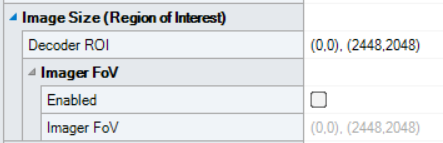
  3. Go to Image Size (Region of Interest) → Imager FoV.
    Placeholder
  4. And select Enabled.

    Placeholder
  5. Then in the line below, hit the three dots at the end:  

    Placeholder
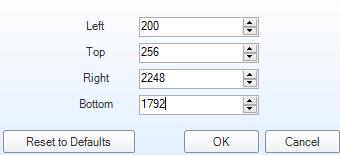
  6. Then set these values:
     

    Placeholder

Risorse correlate