

Details
Step 1: Start In-Sight Vision Suite.
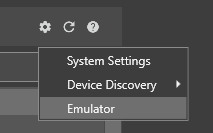
Step 2: From the Home Screen, click on the Settings Gear, and choose Emulator from the dropdown list.
Step 3: In the Emulator Configuration dialog box, select a model you want to emulate.
Step 4: The Registration section will appear if you choose a supported model (In-Sight 2800 or In-Sight 3800 models).
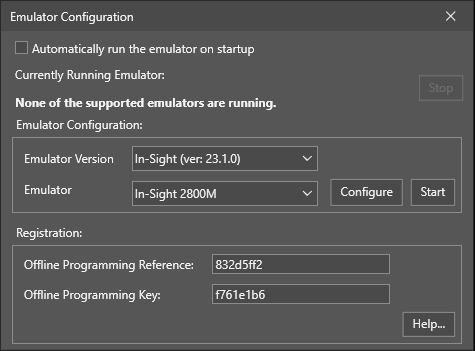
Step 5: On this page, copy the Offline Programming Reference string into the text box labeled "Offline Programming Reference." Then, press the "Generate Key" button to generate the unlocking Offline Programming Key.
Step 6: In the In-Sight Vision Suite dialog box, enter the generated Offline Programming Key in the box labeled "Offline Programming Key". Apply the change, then close the Options dialog box.
Generatore di chiavi per In-Sight
In qualità di utente registrato ai sistemi di visione Cognex, puoi installare ed eseguire In-Sight Explorer e/o In-Sight Vision Suite su uno o più computer senza restrizioni temporali, a condizione che almeno un sistema In-Sight sia presente sulla stessa rete del⁄dei PC.
