Question
The Enabled property of the Write Image functionality can be assigned to a pass/fail result in the EasyBuilder jobs, but only one Write Image functionality is available in one job.
How can I save the images into different folders on the FTP server, depending on a pass/fail result?
Answer
This can be done by determining the folder name in a Math tool, depending on the pass/fail result.
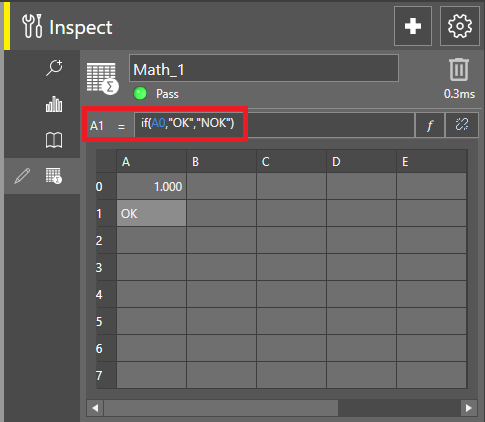
For example, let's suppose that the pass/fail result is located in the A0 cell within a Math tool, then using the below function in another cell will generate "OK" or "NOK" strings:
if(A0,"OK","NOK")
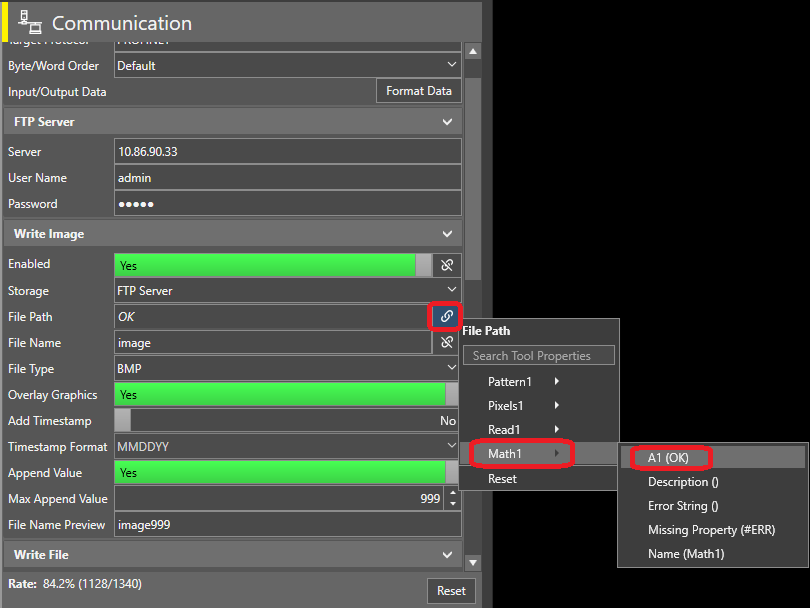
Then linking this cell to the File Path property of the Write Image functionality will save the images under the correct FTP folder depending on the pass/fail result: