In What Cases, Findline, Linemax, and Smartline Are Suggested
This is a comparative explanation for better understanding VisionPro's three line Finding tools and also a guide to choosing one of them for real applications
In VisionPro, there are three line finding tools for extracting line from a 2D image.
As you may know, they are FindLine, LineMax, and SmartLine respectively.
As the oldest line extraction tool, FindLine only extracts one line as output.
So, if the requirement is to extract only one most evident line (forms highest contrast around the line) from a ROI of image, then FindLine is the right answer.
But if multiple lines are visible in a ROI of image and the number of desired lines is not one or the only one desired line is not always most evident, then LineMax or SmartLine are being used for extracting multiple lines from the ROI of image.
Both LineMax and SmartLine can extract multiple lines as output, but unlike LineMax, SmartLine supports labeled output.
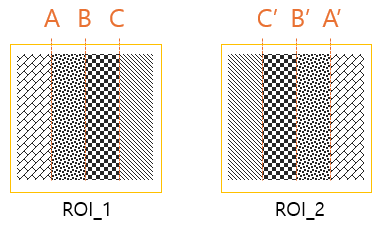
The above figure shows two ROIs in which four types of texture patterns are concatenated, but in reversed order. Both LineMax and SmartLine can extract three lines at the boundary of two adjacent texture patterns in both ROI_1 and ROI_2. However, LineMax does not differentiate line ‘A’ and line ‘B’ by their surroundings texture patterns. But recently, in many cases, users want to identify extracted lines not from their orientation or length but from surface or material’s inherent characteristics like color, gradient, and texture pattern, etc. In the case of LineMax, users must build their own rules to identify them and generally its difficulty rises rapidly when the number of desired line increases.
Suppose the above four texture patterns are from four different panels which are stacked with a bottom to top order and ROI_1 is from a cropped region of left border and ROI_2 is from a cropped region of right border. Then line A and A’ shows the boundary of the second layer from the bottom and line B and B’ shows the boundary of the third layer from the bottom and line C and C’ shows the boundary of the top layer. In this case, line finding users may want to have a line finding solution which not only can find each layer boundary line but also can identify them.
SmartLine can identify extracted lines by learning each line’s local contextual information (including color, gradient, texture, and other statistical information) and according to the feature information to differentiate them and match them with learned label. Of course, SmartLine needs pre-learning with a few labeled datasets before using it.
Here is a simple test for showing the identification capability of SmartLine:
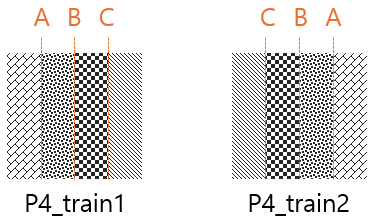
Train SmartLine with following two images
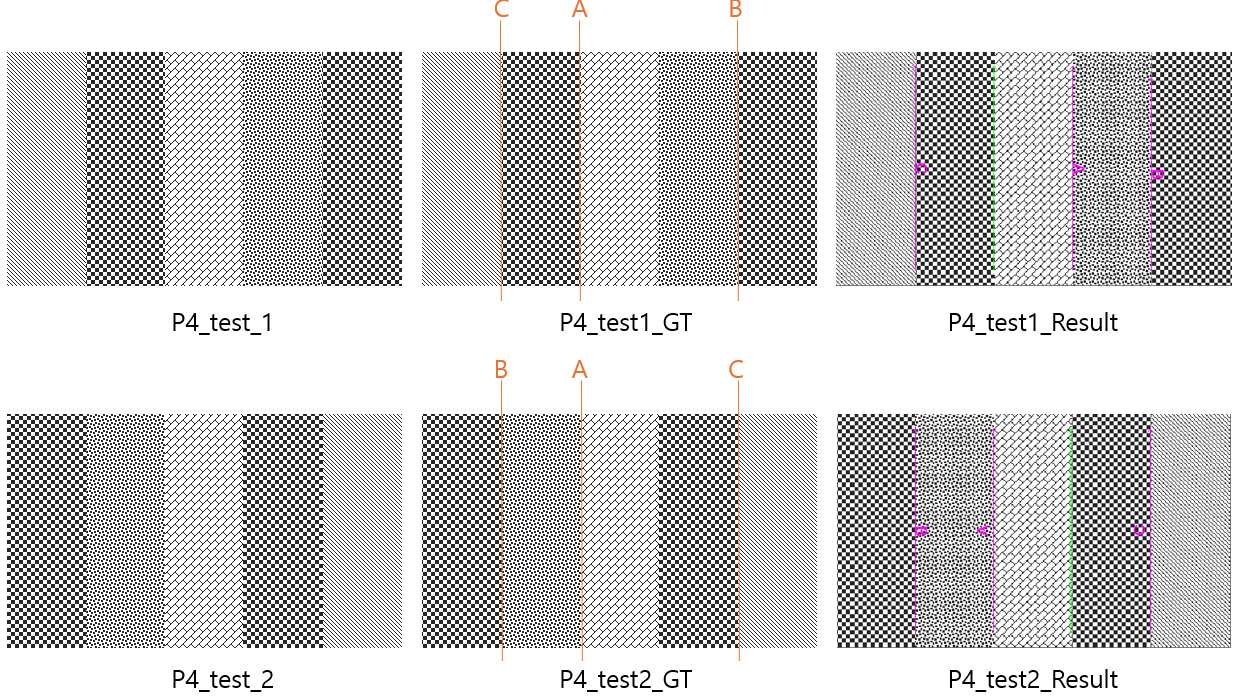
Run trained SmartLine with two images of arbitrary mixed texture combinations
The above two tests show that SmartLine is a powerful line finding tool with the capability of line identification.
The following rules can be a guide for choosing SmartLine over LineMaxTool:
The desired line can disappear, and it needs to be known.
The order of lines can be mixed, and it needs to be known.
Like the above experiment, one well known application of SmartLine is multiple translucent/transparent panel alignment process. For fine alignment, each detected panel edge needs to be identified, and then fine adjustment will be done to the corresponding panel via translation or rotation to align it with a reference line. SmartLine can learn each panel’s inherent local contextual information and utilize that information to identify extracted lines. So, when multiple panel edges are detected, SmartLine can show which edge is from which panel.
Note: All the above line finding tool names and tests are valid with VisionPro 9.23