

Details
Step 1: Start In-Sight Vision Suite.
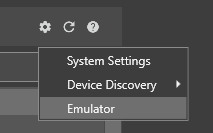
Step 2: From the Home Screen, click on the Settings Gear, and choose Emulator from the dropdown list.
Step 3: In the Emulator Configuration dialog box, select a model you want to emulate.
Step 4: The Registration section will appear if you choose a supported model (In-Sight 2800 or In-Sight 3800 models).
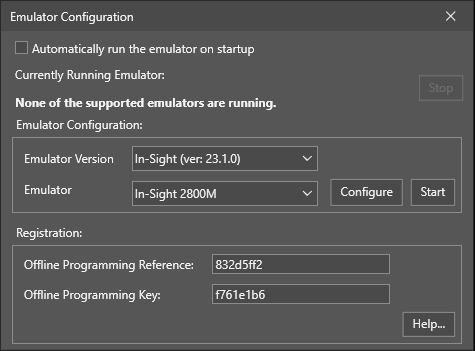
Step 5: On this page, copy the Offline Programming Reference string into the text box labeled "Offline Programming Reference." Then, press the "Generate Key" button to generate the unlocking Offline Programming Key.
Step 6: In the In-Sight Vision Suite dialog box, enter the generated Offline Programming Key in the box labeled "Offline Programming Key". Apply the change, then close the Options dialog box.
In-Sight Key Generator
As a registered user of Cognex vision systems, you are entitled to install and run In-Sight Explorer and/or In-Sight Vision Suite software on one or more PCs with no time limit, as long as at least one In-Sight system is located on the same network as the PC(s).
