

Details
The following instructions will help you with this process:
Step 1: Start In-Sight Explorer.
Step 2: Under the System menu, select Options. The Options dialog box will appear with emulation selected by default.
NOTE: DO NOT CLOSE THE OPTIONS DIALOG BOX UNTIL INSTRUCTED. If you accidentally close it, you will need to start over from step 2.
Step 3: In the Registration Section of the dialog box, locate the 8-character Offline Programming Reference string.
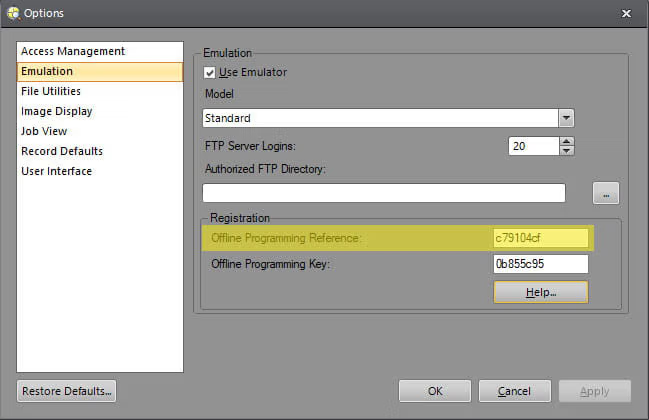
Step 4: On this page, copy the Offline Programming Reference string into the text box labeled "Offline Programming Reference." Then, press the "Generate Key" button to generate the unlocking Offline Programming Key.
Step 5: In the In-Sight Explorer dialog box, enter the generated Offline Programming Key in the box labeled "Offline Programming Key". Apply the change, then close the Options dialog box.
In-Sight Key Generator
As a registered user of Cognex vision systems, you are entitled to install and run In-Sight Explorer and/or In-Sight Vision Suite software on one or more PCs with no time limit, as long as at least one In-Sight system is located on the same network as the PC(s).
