

Question
How to set a password for DataMan readers?
Answer
To perform this operation, you have to have DataMan Setup Tool sw installed; if not, you can download it from here:
https://support.cognex.com/en/downloads/dataman/software-firmware
Once installed, you have to select the reader you want to program or, in this case, protect, and click connect on the button in the lower right part of the screen.
Once connected, you have to go to Communication > Advanced > Network Settings > Authentication and from there, set your preferred password in the specific field (Username is fixed) and after this, select the Authentication Enabled flag.
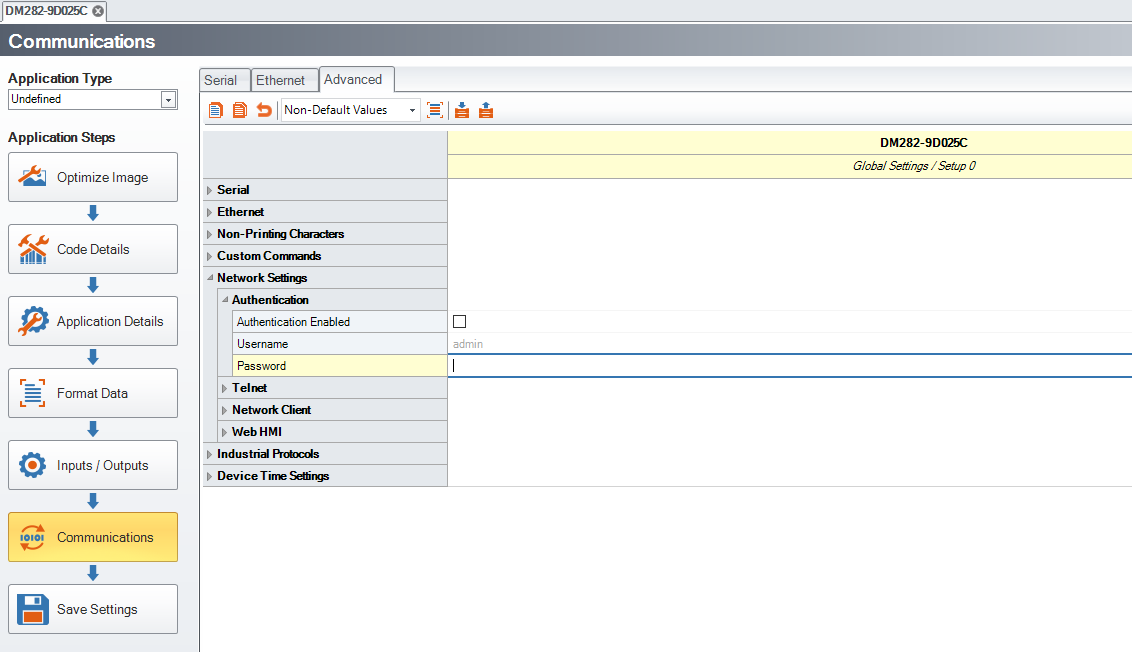
Then click Save Settings.
As you see, to save this change, you have to use the newly inserted pw.
From now on, a window with a password request will be prompted every time you will try to connect to the reader.
PLEASE NOTE:
PW in DataMan readers only applies to Ethernet enabled devices.
USB and RS232 systems do not have this option
