

Question
How to reassign Assembly Number for TruCheck verifier?
Answer
The error message is generated when the assembly number for a model is not found in the handshake between the hardware and the software.
To solve the problem here is the procedure to restore the setting.
- In the software user interface under the ‘Options’ menu selects ‘Advanced Settings’
- Enter the password 789
- From the ‘Advanced Settings’ Menu press and hold the CTRL → ALT → Shift → and A keys on your keyboard (all these keys at the same time)
You should see a small menu pop up like this
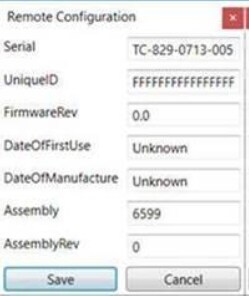
If the setting has been lost usually the serial number in the first field will need to be restored, enter the full serial number in the first field.
TC-XXX-XXXX-XXX
- The sixth field, ‘Assembly’ is where you will enter the assembly number for your hardware, according to the following table:
| Model# | Assembly# | Product Name |
| TC-825 | 5983 | DPM Tower |
| TC-827 | 5214 | Omni HD |
| TC-829 | 6599 | Optima |
| TC-829 | 5279 | Optima Plus+ |
| TC-833 | 5001 | Omni Wide Angle |
| TC-836 | 5599 | Omni XL |
| TC-850 | 5964 | FlexHite |
| TC-853 | 5985 | FlexHite HD |
| TC-861 | 6685 or 6571 | FlexHite DPM Dome HD |
| TC-863 | 6644 | FlexHite DPM Dome |
