Cognex Support Hub


How to Decipher Data Validation Failure Results and Error Codes
Guide on reading validation error codes in DataMan Setup Tool
09/15/2024
Guide on reading validation error codes in DataMan Setup Tool
Below are the results of two validations that failed. You would like to know how to interpret the validation failure data.
<invalid position=”39” error_code=”7” error=”invalid Data” />
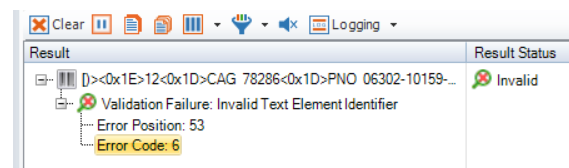
To determine the location of the error (Error Position), count the number of digits from left to right, counting non-printable characters as one digit. The first digit will always be zero, then one, then two…
For example – for the data below, all the non-printable ASCII characters were replaced with an asterisk (*)
[)><0x1E>12<0x1D>CAG 75276<0x1D>PNO 56302-13159-023<0x1D>SEQ B3146-00015<0x1D>(MFR 1LFX2)<0x1E><0x04>

Error Position: 53 In this example the error started at the 53rd character.
Error Code: 6 (Invalid Text Element Identifier) The pair of parentheses should not be there.
The error position could indicate one of the following three scenarios:
Examples:
[)><0x1E>12<0x1D>CAG 75276<0x1D>PNO 56302-13159-023<0x1D>SEQ B3146-00015<0x1D>(MFR 1LFX2)<0x1E><0x04>
Error Position: 53
Error Code: 6 (Invalid Text Element Identifier) The pair of parentheses should not be there.
[)><0x1E>06<0x1D>17V12345<0x1D>1P234tyu<0x1D>S6789<0x1E><0x04>
Error Position: 18
Error Code: 7 (Invalid Data) Lower case characters are invalid characters.
[)><0x1E>12<0x1D>UID LDN41164 123 ABC<0x1E><0x04>
Error Position: 12
Error Code: 7 (Invalid Data) The spaces should not be there.
[)><0x1E>12<0x1D>UIDLDN41164123ABC<0x1E><0x04>
Error Position: 7
Error Code: 6 (Invalid Text Element Identifier) The qualifier “UID” needs a space after it.
[)><0x1E>12<0x1D>PNR 901-366-302-107<0x1E><0x04>
Error Position: 7
Error Code: 13 (Invalid application field) You cannot have a PNR without first having a UID.
The Data Validation Fail error codes:
Invalid symbology identifier. The symbology identifier is the 3-character string that not only identifies the type of symbology used for encoding the data but also describes how to process the data. This string may be optionally passed as input to the tool in addition to the decoded data either as a separate entity or by prefixing it to the data stream.
Example: For a UCC/EAN-128 symbol, the symbology identifier is ]C1. In some applications, this will be the only way to accurately and automatically differentiate between in-house or industry Code 128 and UCC/EAN-128 symbols (that encode EAN.UCC Application Identifiers). Without symbology identifiers, you wouldn't know how to process the data in the symbol.
Invalid application data: if the data does not meet application-specific requirements.
Example: DoD UID applications have the following requirements: The enterprise ID string of characters will not exceed 13 characters, excluding the data qualifier. The original part, lot or batch number string of characters (including permissible special characters) will not exceed 32 characters, excluding the data qualifier. The serial number string of characters (including permissible special characters) will not exceed 30 characters, excluding the data qualifier.