

Details
Issue:
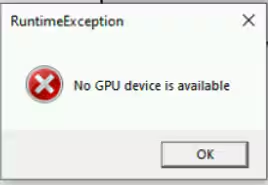
When attempting to import a .vwrs high detail model in Designer 4.5.0 (VisionPro Deep Learning 3.3.2 and VisionPro 9.21), users may encounter a runtime exception pop-up stating "No GPU device is available."
Cause:
This issue arises due to compatibility problems between the software versions and the GPU drivers, which prevent the system from recognizing the GPU device.
Affected Configurations:
- Designer Version: 4.5.0
- VisionPro Version: 9.21
- VisionPro Deep Learning Version: 3.3.2
- GPU: Various models, including NVIDIA GeForce RTX series
Resolution:
To resolve this issue, follow these steps:
- Download the VisionPro 9.21 Supplemental Installer:
- Visit the Cognex support website and download the "VisionPro 9.21 Supplemental Installer for VisionPro Deep Learning Compatibility." - Support - VisionPro 9.21 - Supplemental Installer For VisionProDL Compatibility | Cognex
- Install the Supplemental Installer:
- Run the installer and follow the on-screen instructions to complete the installation.
- Restart the System:
- After installation, restart your computer to ensure all changes take effect.
- Verify the Installation:
- Open Cognex Designer 4.5.0 and attempt to import the .vwrs high detail model again. The runtime exception should no longer appear, and the GPU device should be recognized correctly.
Additional Notes:
- Ensure that your GPU drivers are up to date. If the issue persists, consider updating to the latest driver version compatible with your GPU model.
- If you continue to experience issues, please contact Cognex support for further assistance.
By following these steps, you should be able to resolve the "No GPU device is available" runtime exception and successfully import high detail models in Cognex Designer 4.5.0.
