

Details
IN-SIGHT EXPLORER
Step 1: Start In-Sight Explorer.
Step 2: Under the System menu, select Options. The Options dialog box will appear with emulation selected by default.
NOTE: DO NOT CLOSE THE OPTIONS DIALOG BOX UNTIL INSTRUCTED. If you accidentally close it, you will need to start over from step 2.
Step 3: In the Registration Section of the dialog box, locate the 8-character Offline Programming Reference string.
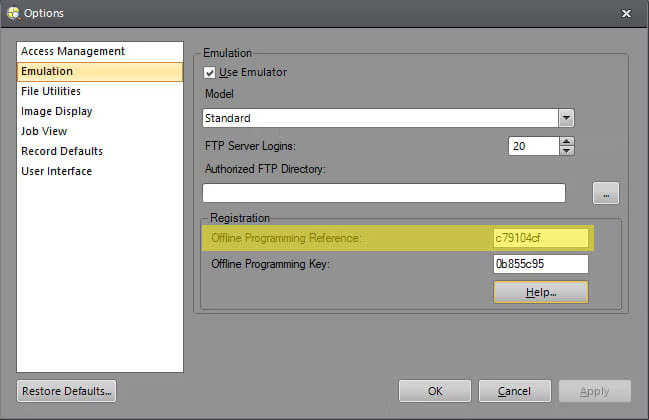
Step 4: On this page, copy the Offline Programming Reference string into the text box labeled "Offline Programming Reference." Then, press the "Generate Key" button to generate the unlocking Offline Programming Key.
Step 5: In the In-Sight Explorer dialog box, enter the generated Offline Programming Key in the box labeled "Offline Programming Key". Apply the change, then close the Options dialog box.
IN-SIGHT VISION SUITE
Step 1: Start In-Sight Vision Suite.
Step 2: From the Home Screen, click on the Settings Gear, and choose Emulator from the dropdown list.

Step 3: In the Emulator Configuration dialog box, select a model you want to emulate.
Step 4: The Registration section will appear if you choose a supported model (IS2800 or IS3800 models).

Step 5: On this page, copy the Offline Programming Reference string into the text box labeled "Offline Programming Reference." Then, press the "Generate Key" button to generate the unlocking Offline Programming Key.
Step 6: In the In-Sight Vision Suite dialog box, enter the generated Offline Programming Key in the box labeled "Offline Programming Key". Apply the change, then close the Options dialog box.
Générateur de clés In-Sight
En tant qu’utilisateur enregistré des systèmes de vision Cognex, vous avez le droit d’installer et d’exécuter le logiciel In-Sight Explorer et/ou In-Sight Vision Suite sur un ou plusieurs PC sans limite de temps, à condition qu’au moins un système In-Sight soit situé sur le même réseau que le(s) PC.
