

Details
Issue:
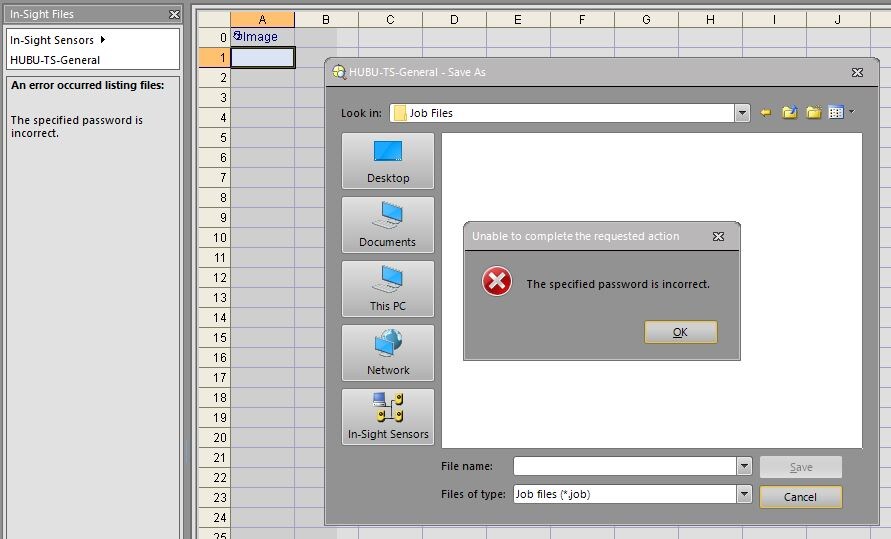
When connecting to the In-Sight Explorer Emulator, the In-Sight Files window does not list any files but it reports "The specified password is incorrect" error, and trying to save the job file on the computer results in the same error message:
Causes:
In-Sight Explorer Emulator uses a built-in FTP server to reach the files on the Emulator. This behavior is similar to how the software accesses the files on a real camera. By default, the In-Sight Explorer Emulator's built-in FTP server is listening on TCP port 21. If there is another FTP server listening on the same port before starting In-Sight Explorer, then the built-in FTP server won't start, and the software will try to access the third-party FTP server when listing or saving the files.
Resolution:
Stop the third-party FTP server before launching the In-Sight Explorer software.
If you are unsure that there is any third-party FTP server listening on TCP port 21, then following the below steps can help to identify it.
- open Command Prompt, and type this command, then press Enter:
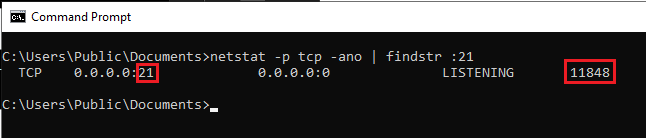
netstat -p tcp -ano | findstr :21
if there are multiple results, then find the one where the port is :21 and note the PID (Process ID) written at the end of the line:
- type the below command, where you replace <PID> with the noted number from the previous step, then press Enter:
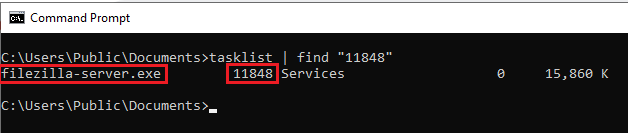
tasklist | find "<PID>" if there are multiple results, then find the one where PID matches the noted one, then you can see the name of the task that is listening on TCP port 21:
Note: you can also use Task Manager in steps 3. and 4. to find the task with the noted PID:

