

Question
How do I perform a hand-eye calibration with an In-Sight 3D-L4000. I have a fixed part, and a moving camera attached on a robot.
Answer
Calibrate the camera as usual (encoder or constant speed) to get a good resolution for your application.
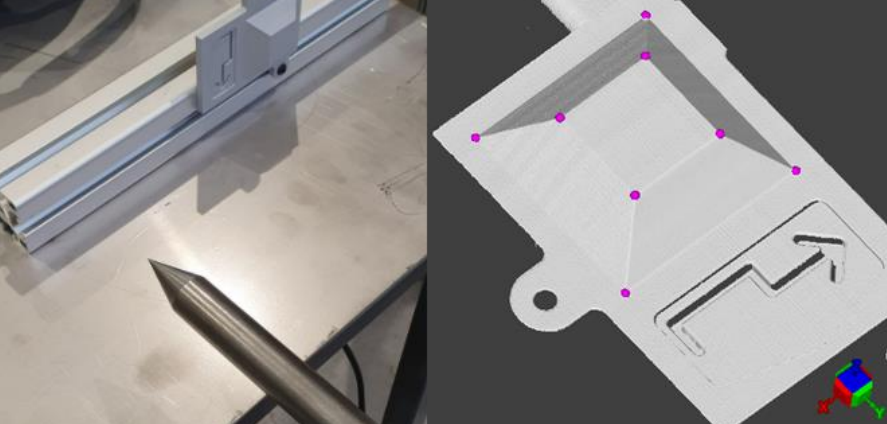
Take a target with easy to identify reference points (3 is the bare minimum) and do a hand-eye calibration:
The robot should have a touch probe to record the coordinates of every point in the robot space
The camera acquires the same reference points (use vision functions to extract the same points of interest). When scanning, make sure the camera trigger moment is fixed. It should always be at the same position to make sure the origin of the camera does not change. If you encounter a drift in the direction of travel, it could come from trigger type.
Finally, use FixtureFromPointsTo3D(camPoints, robotPoints) function to get the transform from robot space to camera space, or FixtureFromPointsToPoints3D(robotPoints, camPoints) to get the transform from camera space to robot space (FixtureHandEyeCamToRobot).
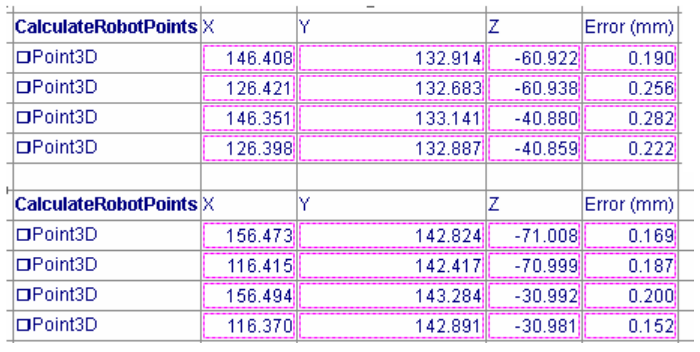
Control the RMS by re-calculating the robot points from the camera points with the fixture Camera to Robot FixureHandEyeCamToRobot previously calculated.
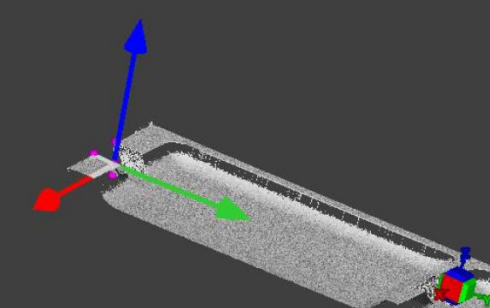
Do your vision application as usual and get a fixture3D in camera space (Fixture3DVisionApplication).
Use ComposeFixture3D(FixtureHandEyeCamToRobot, Fixture3DVisionApplication) to get X,Y,Z and RxRyRz. If your Robot uses FixedAxisXYZ convention, you immediately get the Eulerangles with the desired values. If not, conversions are necessary.
See Also:
FixtureFromPointsToPoints3D - In-Sight®3D Help - FixtureFromPointsToPoints3D - Documentation | Cognex
Fixture3D - In-Sight®3D Help - Fixture3D - Documentation | Cognex
