Details
The first step is to pair the reader with the base station.
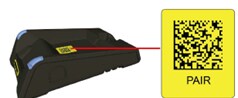
- Using the DataMan 8000 scan the pair code which on the Base Station body, then place the reader in the Base Station.
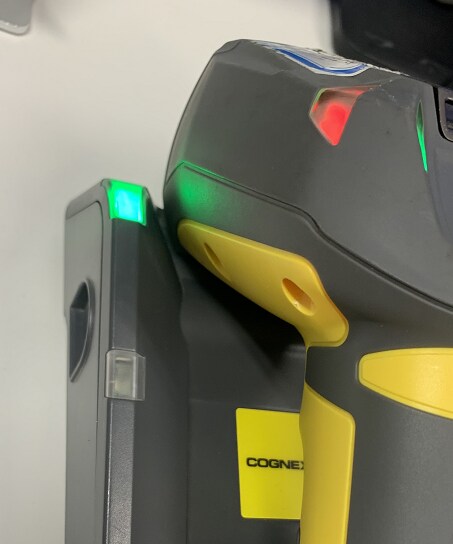
- When the indicator on the Base Station is green, that means the pair is successful.
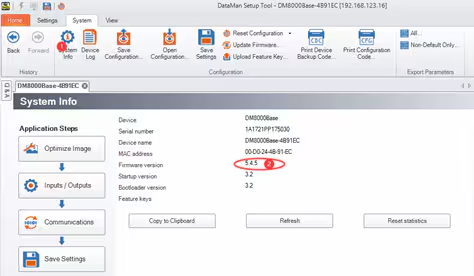
- If the reader fails to pair, check if the Firmware version of the DataMan 8000 and Base Station are the same using a USB cable to connect to the Base Station. If not, upgrade or downgrade the Base Station's firmware to match.
Next setup the Ethernet connection with Base Station using DataMan Setup Tool:
Change the IP Address and Subnet Mask of the Base Station to values that are compatible with the connected network and press Apply.
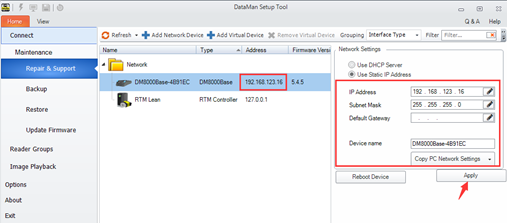
When the Base Station reappears, double-click the Base Station icon to establish the connection. You can obtain the Firmware version from the System Info tab here.
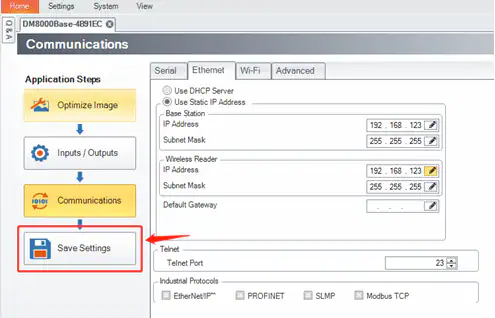
Under the Communications Step, you can set the wireless Reader’s IP address. Ensure the address is on the same subnet as the Base Station and compatible with your network.
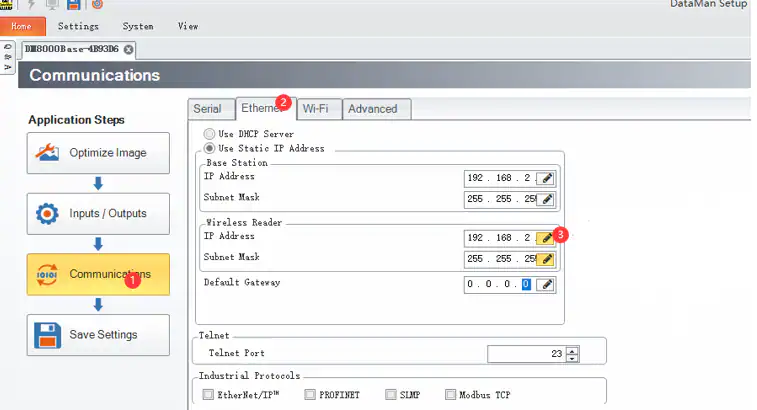
Click the “Save Settings” button.