Centre d’assistance Cognex


Script - Continuous Reading While Discrete Input Line Is Active
This sample script gives a solution for continuously triggering a fixed-mount DataMan reader while its In0 discrete input line is active.
28/02/2025
This sample script gives a solution for continuously triggering a fixed-mount DataMan reader while its In0 discrete input line is active.
When using Continuous (external) Trigger Type on a fixed-mount DataMan reader, the device acquires images as long as the trigger signal remains active. If a symbol is decoded, the reader stops accepting the trigger signal. The following solution keeps the continuous acquisition while the trigger signal is active, even after a symbol is decoded.
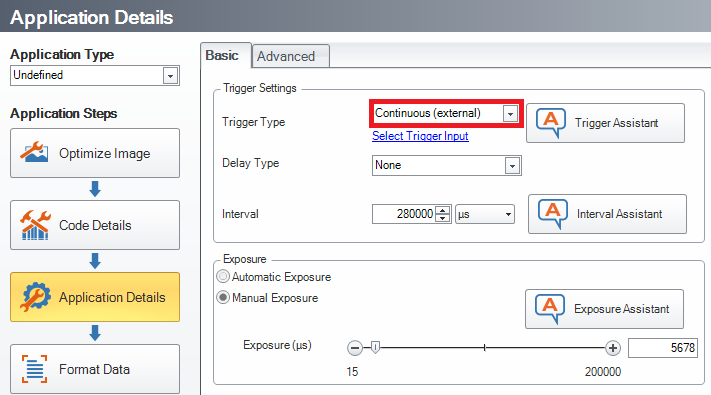
Reset Configuration of the device then set Trigger Type to Continuous (external).
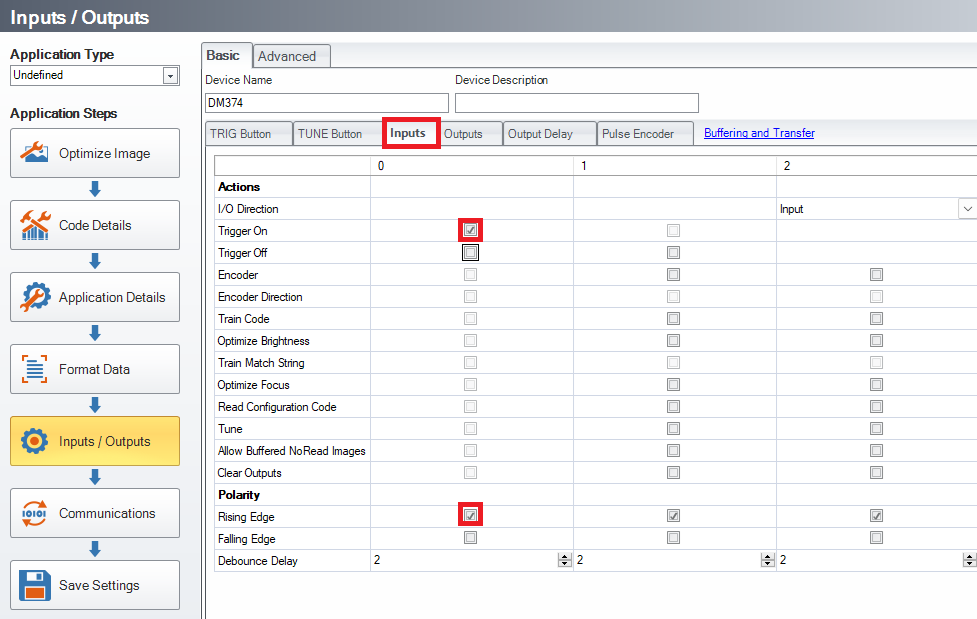
Enable Trigger On and Rising Edge for Input 0.
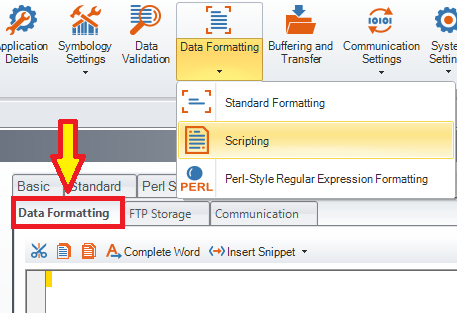
Enable Script-Based Formatting, then copy and paste the below code into the Data Formatting Script, overwriting any existing code there:
var trgEnable = 0;
var prevResult = "";
function onResult (decodeResults, readerProperties, output) {
if (decodeResults[0].decoded) {
newResult = decodeResults[0].content + "\r\n";
if (newResult != prevResult) {
output.content = newResult;
}
else {
output.content = "";
output.events.system = 2;
}
prevResult = newResult;
if (trgEnable) {
dmccCommand("TRIGGER", true);
}
}
}
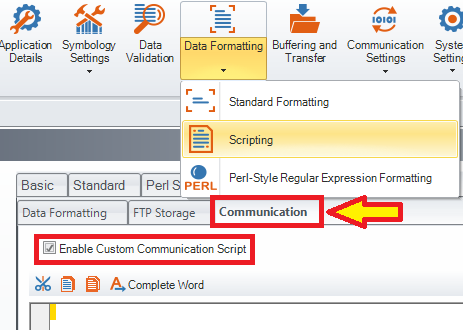
Enable Custom Communication Script, then copy and paste the below code into the Communication Script, overwriting any existing code there:
function CommHandler() {
return {
onConnect: function (peerName) {
this.input1 = registerHandler(Callback.onInput,this.onInput0.bind(this),ConstInput.Input0);
this.send("Connected.\r\n");
return true;
},
onDisconnect: function () {
deregisterHandler(this.input1);
},
onError: function (errorMsg) {
this.send("ERROR: " + errorMsg + "\r\n");
},
onInput0: function (inputs) {
trgEnable = inputs;
if (trgEnable) {
prevResult = 0;
}
else {
dmccCommand("TRIGGER", false);
}
},
};
}