

Details
The following instructions will help you with this process:
Step 1: Start In-Sight Explorer.
Step 2: Under the System menu, select Options. The Options dialog box will appear with emulation selected by default.
NOTE: DO NOT CLOSE THE OPTIONS DIALOG BOX UNTIL INSTRUCTED. If you accidentally close it, you will need to start over from step 2.
Step 3: In the Registration Section of the dialog box, locate the 8-character Offline Programming Reference string.
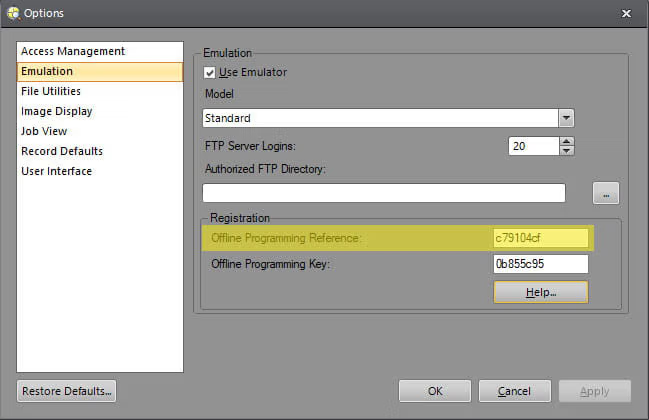
Step 4: On this page, copy the Offline Programming Reference string into the text box labeled "Offline Programming Reference." Then, press the "Generate Key" button to generate the unlocking Offline Programming Key.
Step 5: In the In-Sight Explorer dialog box, enter the generated Offline Programming Key in the box labeled "Offline Programming Key". Apply the change, then close the Options dialog box.
Generador de claves de In-Sight
Como usuario registrado de los sistemas de visión de Cognex, tiene derecho a instalar y ejecutar el software In-Sight Explorer y/o In-Sight Vision Suite en una o más PC sin límite de tiempo, siempre y cuando al menos un sistema In-Sight esté ubicado en la misma red que el/los PC(s).
