Question
How can I load jobs through the camera's discrete input lines?
Answer
The camera jobs can be identified by a number that is placed at the beginning of the job name, this is called Job ID. Some examples:
1.job or 1.jobx (Job ID is 1)
5test.job or 5test.jobx (Job ID is 5)
42_pick.job or 42_pick.jobx (Job ID is 42)
A few recommendations for the Job ID:
do not use the same Job ID for multiple jobs, the Job ID must be unique on the camera
do not use leading zeros (e.g. 005_test.job)
use the range of 0...999
If you need to load jobs through the camera's discrete input lines, then the Job ID should be sent to the camera as a binary number. Since the number of the camera's discrete input lines is very limited, the number of different jobs that can be loaded is also very limited. If you need to load more different jobs than the camera's available discrete input lines make possible, then either an I/O extension module can be used if such a module is available for that camera model (e.g. CIO-MICRO for In-Sight Explorer cameras), or an Ethernet-based communication protocol gives more flexibility.
In-Sight Explorer cameras (In-Sight Gen2 models, for example In-Sight 7802, except In-Sight 2000 and In-Sight 2001)
The below input lines are required:
- Job Load Switch
- Job ID Number
Since these cameras can have a maximum of 3 user-configurable input lines, a maximum of 2 input lines are available for defining the Job ID. It means that jobs with 0, 1, 2, or 3 Job IDs can be loaded on these cameras, so switching between 4 jobs is possible. It can be extended by using an I/O extension module.
Sequence is:
- select the Job ID (0, 1, 2, or 3) through the Job ID Number inputs
give a rising or falling edge (depending on the Edge Type setting) to the Job Load Switch input
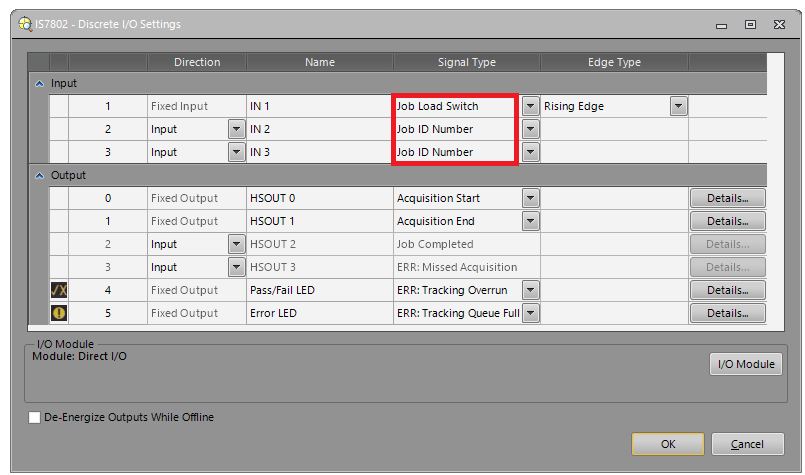
For example, if there are 0.job, 1.job, 2.job, and 3.job on the camera, then the following Job ID Number input activations (0 = active, 1 = inactive) are required to load those jobs if IN2 and IN3 lines are configured as Job ID Number inputs:
| IN2 | IN3 | Job to load |
| 0 | 0 | 0.job |
| 1 | 0 | 1.job |
| 0 | 1 | 2.job |
| 1 | 1 | 3.job |
Note: the above is not applicable for loading jobs through In-Sight 2000 and In-Sight 2001 cameras' discrete input line. Those cameras are using a single input for loading multiple jobs with pulses. For more details, please refer to this related help section.
In-Sight Vision Suite cameras (In-Sight 2800 and In-Sight 3800 series)
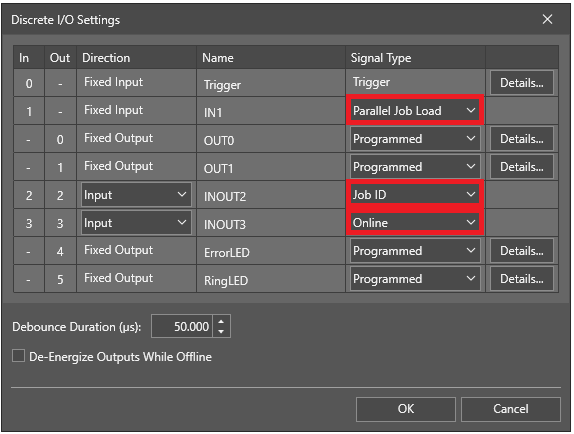
The below input lines are required:
- Parallel Job Load
- Job ID
- Online
Since these cameras can have a maximum of 3 user-configurable input lines, only 1 input line is available for defining the Job ID. It means that only jobs with 0 and 1 Job IDs can be loaded on these cameras, so switching only between 2 jobs is possible.
Sequence is:
- set the camera Offline by de-activating the Online input line (normally, this line should be activated to be the camera in Online mode)
- select the Job ID (0 or 1) through the Job ID input
- give a rising edge to the Parallel Job Load input