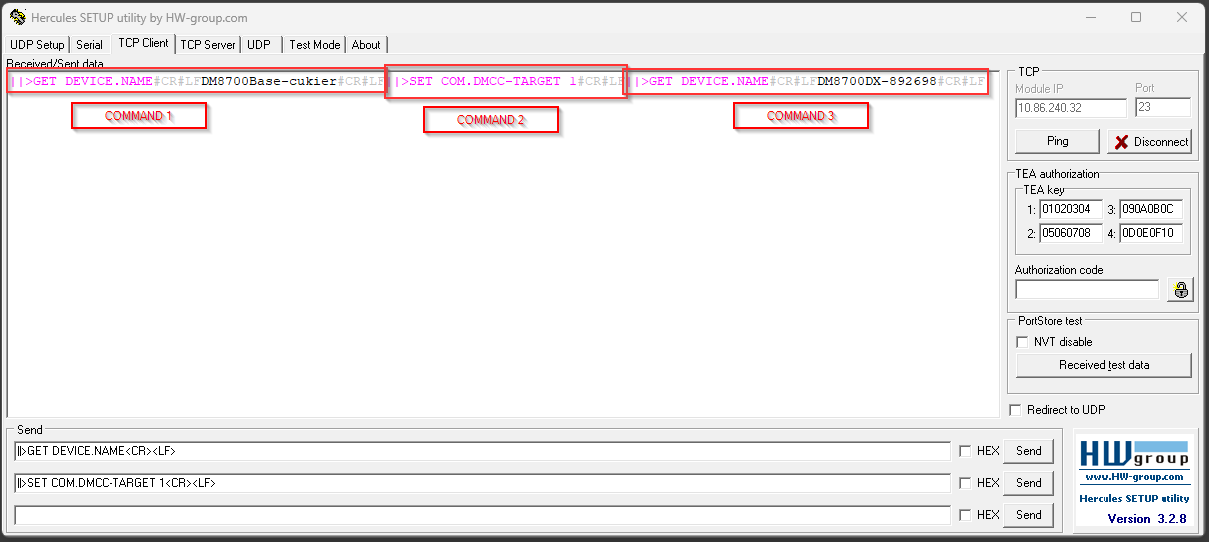
Question
While using Dataman SDK you can experience problem while getting readresults from DataMan 8700 + base. In that situation changing DMCC-Target is needed.
Answer
For the DataMan 8700, the reader does not have a dedicated IP address. To send a DMCC command to the reader, you must first connect to the Base Station and use a targeting DMCC which targets the reader.
The two targeting commands are COM.DMCC-TARGET and COM.DMCC-DEFAULT-TARGET. After using these commands, every DMCC sent to the Base Station now targets the reader.
Steps:
- connect with Terminal software (Hercules/Putty) to DM IPs
- Send getter command: ||>GET DEVICE.NAME\r\n - reply should be base name fe.DM8700Base-86F30A
- Send setter command: ||>SET COM.DMCC-TARGET 1\r\n - no response
- Send getter command: ||>GET DEVICE.NAME\r\n - reply should be handheld name fe. DM8700DX-8E6FD0