Details
In-Sight Explorer
The Inspection Completed bit is updated (toggled) automatically after each image acquisition on the In-Sight Explorer cameras.
In-Sight Vision Suite
The Inspection Completed bit is NOT updated (toggled) automatically on the In-Sight Vision Suite cameras.
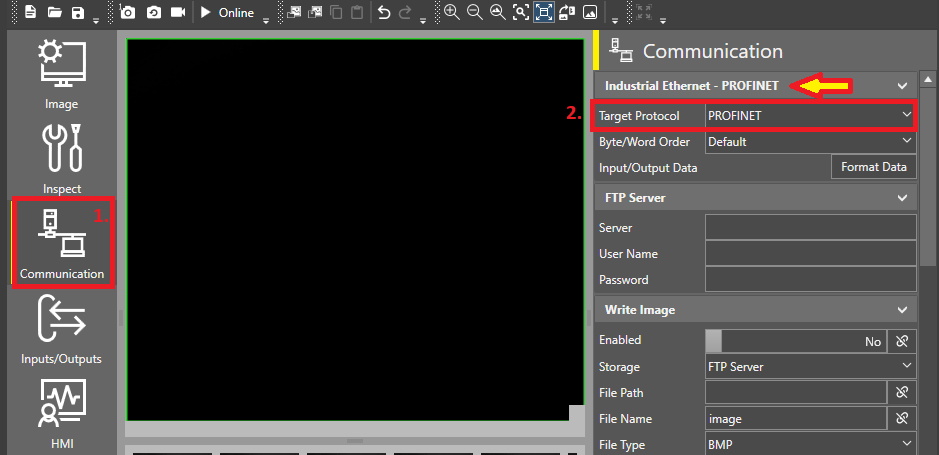
For In-Sight Vision Suite EasyBuilder jobs, the Inspection Completed bit will be updated (toggled) after the inspection if the industrial communication protocol is selected in the job:
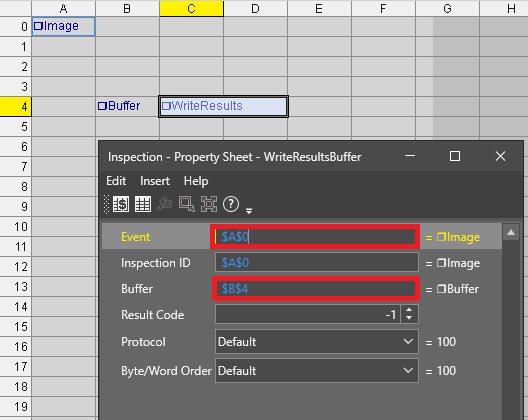
For In-Sight Vision Suite Spreadsheet jobs, the Inspection Completed bit will be updated (toggled) after the inspection if there is an active WriteResultsBuffer() function in the job and its Event is fired. If there is no need to send any custom data buffer to the PLC, then follow the below steps:
1. add a FormatOutputBuffer() function into a blank cell without adding any items in the buffer,
2. then add a WriteResultsBuffer() function into another blank cell, set its Event property to $A$0, and refer in its Buffer property to the cell where the previously created FormatOutputBuffer was created.