

Question
Where did the option to output code quality results go?
Answer
As mentioned on page 64 in the DataMan 475 Verifier Reference Manual, "Navigate to the location of the Scripting templates: C:\Program Files (x86)\Cognex\DataMan\DataMan Software vx.x.x\Scripts. One scripting template generates results to a .CSV file and the other generates results to an .HTML file."
Once Engineering enabled the ability for the Data Logging to output the reports, they removed the script from newer versions of the Setup Tool. The script was not allowing for the HTML reports to include all intended data.
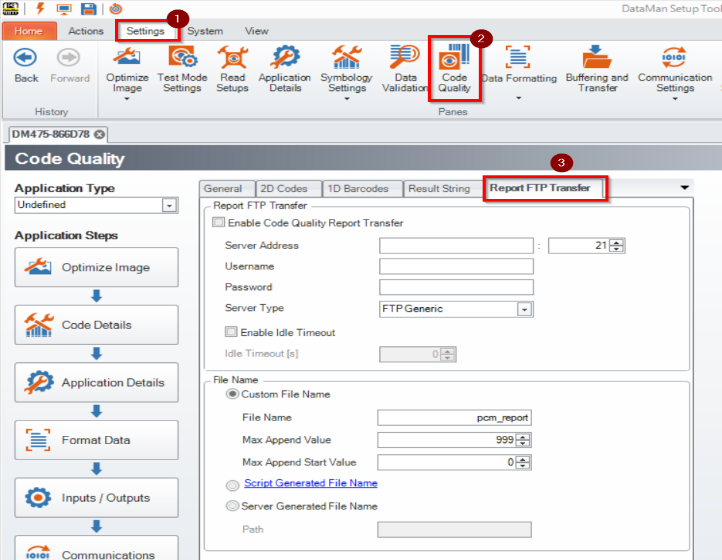
Customers have two options to save HTML quality reports. In the Code Quality section of the setup tool, in the Report FTP Transfer tab, access to an FTP can be configured to send the quality reports. This is the suggested method, especially for high-speed inline users.
While the DataMan Setup Tool application is open and connected to the verifier, by enabling the Generate Report in the TruCheck configuration or the Generate Code Quality reports from the Setup Tool side, HTML reports will be generated in the below folder. C:\Users\{USER_NAME}\Documents\DM475-XXXXXX\CodeQuality\
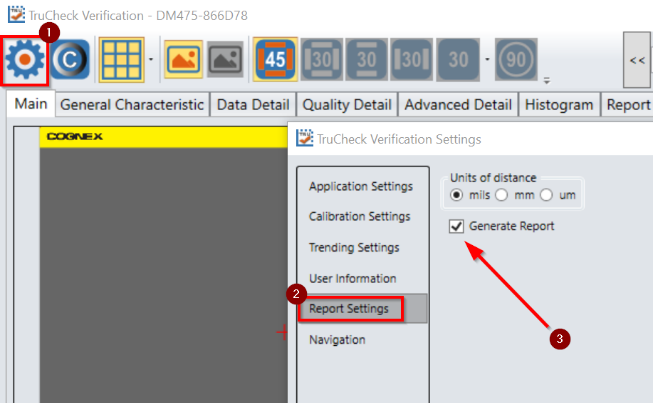
Note: The only downside to this method is that the DataMan Setup Tool will need to remain opened and connected to the verifier to generate reports.
