Question
How can I change the language of Cognex Designer to English?
Answer
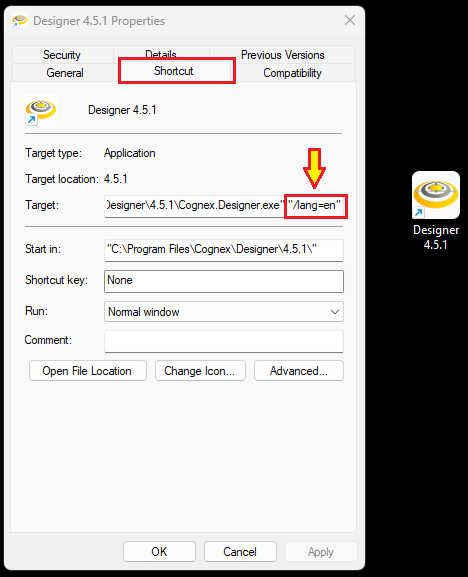
If Cognex Designer version is 4.0 or newer, then adding the "/lang=en" argument to the Designer shortcut created by the installer will instruct the software to start the software in the English language.
Right-click on the Designer shortcut and add this argument at the end of the Target field under the Shortcut tab.
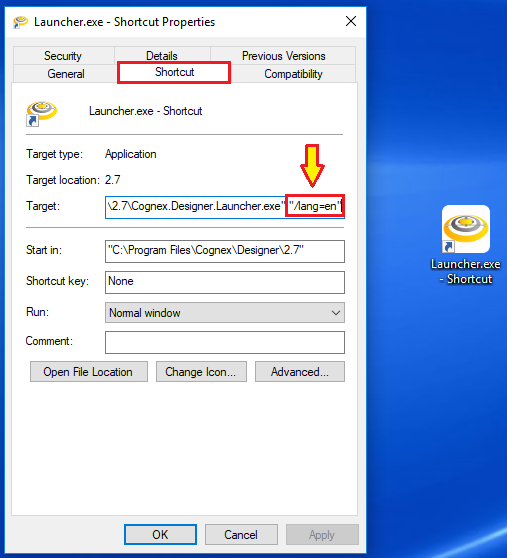
If Cognex Designer version is 2.7 or earlier, then the "/lang=en" argument has to be added to a newly created shortcut to the "Cognex.Designer.Launcher.exe":
- Navigate to "C:\Program Files\Cognex\Designer\2.7\" and find the "Cognex.Designer.Launcher.exe" application.
- Create a shortcut for the "Cognex.Designer.Launcher.exe" application.
- Open the properties for the newly created shortcut.
- Under the Shortcut tab, in the 'Target' field add "/lang=en" as an argument for English, and click Apply.
- Now if the newly created Designer Launcher shortcut is used to launch Designer, the projects will open with the English language setting.