Cognex Support Hub


Script - Application - Communication with HTTP Server
Sample application description how to communicate DataMan with HTTP server.
04/14/2025
Sample application description how to communicate DataMan with HTTP server.
This script is designed for use in applications where HTTP communication is required between Cognex DataMan readers and a server. It allows for easy integration of Cognex readers with external servers, facilitating the transfer of data.
This script is specifically designed to work with fixed-mount Cognex DataMan readers. Below is the list of hardware needed:
The HTTP communication between the Cognex DataMan reader and the server is structured in a standard HTTP format. Below is the basic structure of the HTTP message used in this communication:
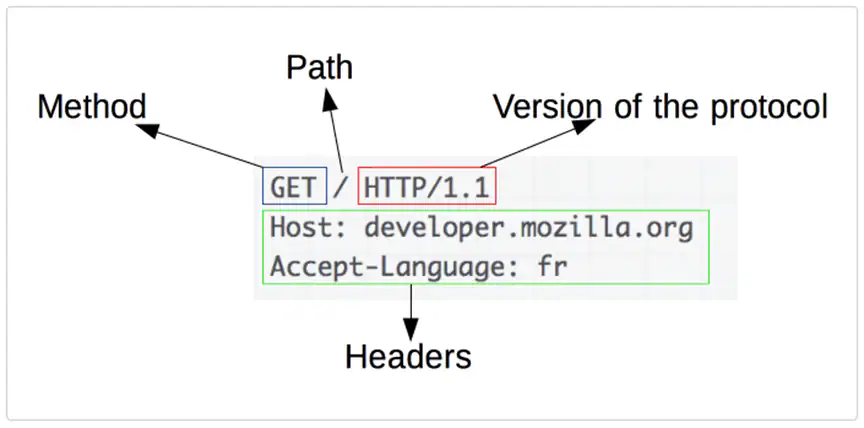
(At this point, you would include an image of the HTTP request structure, but it's currently missing in the provided text.)
The response from the server can vary depending on the request, and it may include confirmation or additional data, as shown in the next picture.
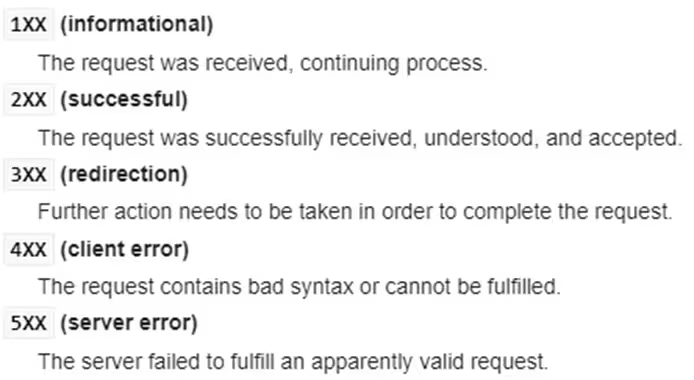
(An image of possible server responses, like HTTP status codes or data, would go here.)
To enable script-based communication, the script should be uploaded to the reader's configuration interface.
Enable Script-Based Formatting:
Ensure that script-based formatting is enabled, which allows the reader to process custom scripts.
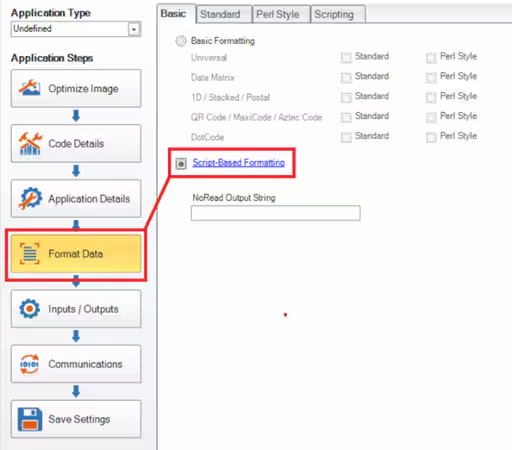
(At this point, you would include an image of the setting or toggle in the DataMan configuration interface.)
Upload Scripts to the Reader:
Ensure that the scripts are correctly placed in the Data Formatting tab for data manipulation and in the Communication tab for setting up HTTP communication.
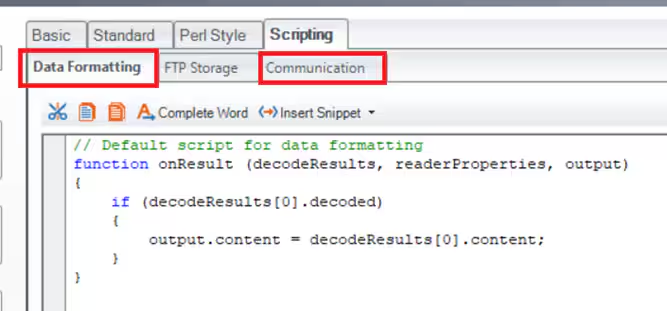
(Another image would go here showing how the scripts are uploaded or a screenshot of the DataMan interface.)
This guide provides a basic overview of the HTTP communication process between the DataMan reader and the server. The script can be customized based on specific application needs.
'use strict';
let decodedCode = '';
let outputString = '';
function onResult (decodeResults, readerProperties, output) {
if (decodeResults[0].decoded) {
decodedCode = decodeResults[0].content;
}
if (decodedCode!='') {
const codeData = { //Constructing data fields (they can be freely modified)
readerConex0100: {
header: {
messageType: "stationConfirmation",
messageVersion: "0100",
senderId: "COGNEX-DM474",
siteId: "Side-01",
clientId: "Test"
},
repackConfirmation: [
{
containerId: decodedCode,
containerType: "EUR6",
containerWeight: 4,
containerStatus: "Open",
locationId: "AZONE",
}
]
}
};
outputString = getHTTPMsg(JSON.stringify(codeData));
}
output.content = outputString;
}
//Fucntion used to format data according to HTTP requierments
function getHTTPMsg (convertdata) {
if (convertdata.length > 0) {
return 'POST ' + HTTP_ADDR + ' ' + HTTP_VER + CRLF +
'Host: ' + HTTP_HOST + CRLF +
'Accept: ' + HTTP_JSON + CRLF +
'Content-type: ' + HTTP_JSON + CRLF +
'Authorization: ' + HTTP_AUTH + CRLF +
'Content-Length: ' + convertdata.length + CRLF + CRLF +
convertdata;
}
}
'use strict';
const LOG = true; //Logging to Device Log enabled
const HTTP_ADDR = '/wms/automation/cognex/1.1.0/cc/'; // address of data stream
const HTTP_HOST = 'http://sample.server.com';; // http address of host server
const HTTP_JSON = 'application/json'; //Application type (JSON)
const HTTP_VER = 'HTTP/1.1';
const HTTP_AUTH = 'SampleKey'; //autentication key
const TCP_IP = 'sample.server.tcp.com'; //Sample address of TCP/IP server
const TCP_PORT = 8500; // TCP IP port decalration
let httpHandler = null;
function CommHandler (localName) {
return {
onConnect: function (peerName) {
logMsg('localName: ' + localName + ' peerName: ' + peerName);
const sourceIP = peerName.split(':')[0];
const localPort = localName.split(':')[1];
if (sourceIP === TCP_IP && localPort === TCP_PORT) {
httpHandler = this;
logMsg('TCP connected');
return true;
}
return false;
},
onDisconnect: function () {
if (this === httpHandler) {
httpHandler = null;
logMsg('TCP disconnected');
}
},
onError: function (errorMsg) {},
onExpectedData: function (inputString) {
if (this === httpHandler) {
logMsg('TCP data received: ' + inputString);
}
return true;
},
onUnexpectedData: function (inputString) {
return true;
},
onTimer: function () {
},
onEncoder: function () {}
};
}
function logMsg (msg) {
if (LOG) {
console.log(msg);
}
}
