Details
Starting from VisionPro 9.6, the preferred security device can be configured. If you have multiple security devices connected to the same vision computer where VisionPro is installed, then the preferred and the selected security device can be checked in the cogtool printout in the following way.
Open Command Prompt, type cogtool -p then press Enter.
If you see none as the Preferred serial number, then VisionPro will pick and use one of the security devices.

Check if you see selected or not selected in brackets after the Serial Number of the security device in cogtool list. VisionPro will use the license on the security device where you see selected.
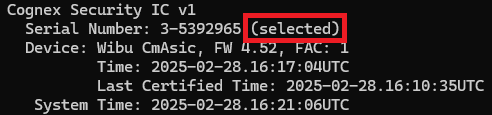
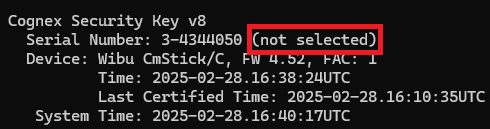
You can set the preferred security device in the following way. Launch the Command Prompt with Administrator privileges and run the below command, replacing <Serial Number> with the Serial Number of the preferred security device:
cogtool --prefer=<Serial Number>
Running cogtool -p again should show the preferred security device, and if that device is available then it will be the selected one:
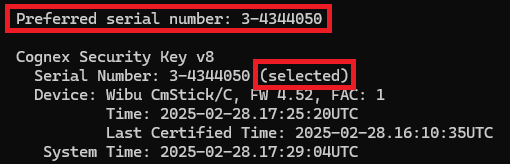
Note: if the preferred security device is not available, then none of the other available security devices will be selected and VisionPro will not see any license.
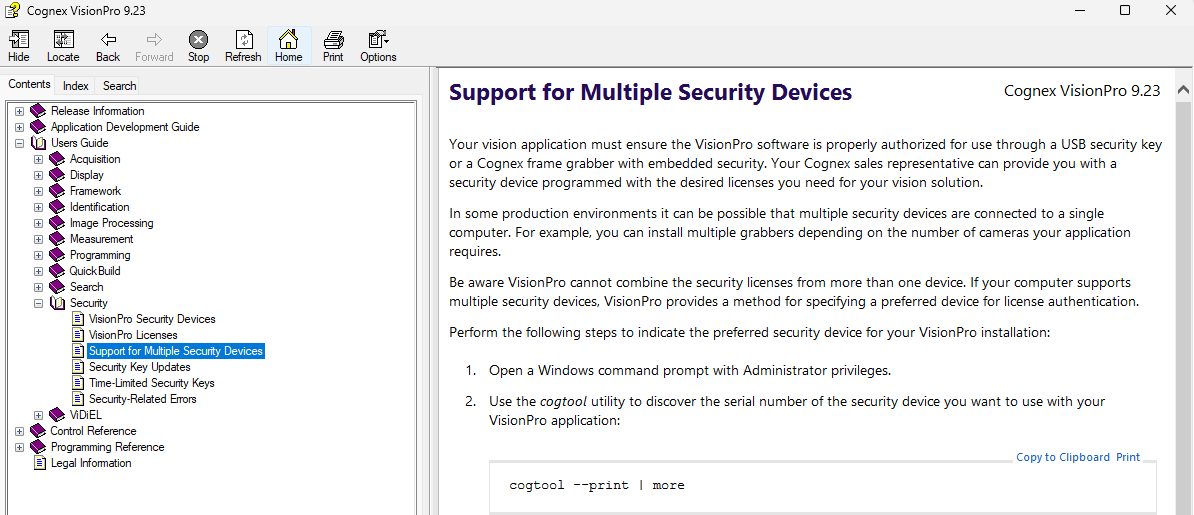
You can check the Support for Multiple Security Devices section in the VisionPro documentation for further details.