

Question
You want to insert a pause or delay after or between parts of the data being outputted. You want something like the KPAUSE function that can be used with DataMan 8050 and DataMan 8600 series readers.
NOTE: These instructions are only intended for units that are connected by USB – either directly or by the BASE. HID mode will need to be enabled
VERY IMPORTANT STEP - you must send the DataMan Control Command (DMCC) command "SET KEY.REDUCE-KEY-UP-USAGE OFF" in order for the below instructions to work. This command needs to be sent to the device connected directly to the USB port – the scanner itself or the BASE. You can send the command several ways:
Using Telnet send the following command - ||>SET KEY.REDUCE-KEY-UP-USAGE OFF
Include the line in the output script – “dmccSet("KEY.REDUCE-KEY-UP-USAGE", "OFF");”. Once the command is executed once, and configuration saved to the scanner, it will not need to be executed again unless the scanner is reset back to factory defaults.
Use the below configuration code to disable KEY.REDUCE-KEY-UP-USAGE
 DM8700_ReduceKeyUps_disable.bmp |  DM8700_ReduceKeyUps_disable.bmp |
 DM8700_ReduceKeyUps_disable.bmp |  DM8700_ReduceKeyUps_disable.bmp |
To insert a pause use a pause sequence ( \x00\xFE\x00\x00\x0F\xAO ) where the last 4 digits ( example - \x0F\xA0 = 4000) are reserved for the length of the delay in hexadecimal.
The example script below using the pause with a delay of 4095 ms ( \x0F\xA0 = 4000). When a code is scanned, the content will output, followed by a 4 second pause, and then “ABC”.
function onResult (decodeResults, readerProperties, output)
{
if (decodeResults[0].decoded)
{
// dmccSet("KEY.REDUCE-KEY-UP-USAGE", "OFF");
output.content = decodeResults[0].content + "\x00\xFE\x00\x00\x0F\xAO" + "ABC";
}
}
To determine the correct HEX value, use any decimal to hexadecimal converter. A link to an Internet decimal to hexadecimal converter page is below:
Decimal to Hexadecimal Converter (rapidtables.com)
Enter the desired pause time in milliseconds as a decimal, and then click the Convert button. The two values you will need to use are in the Hex signed 2's complement section.
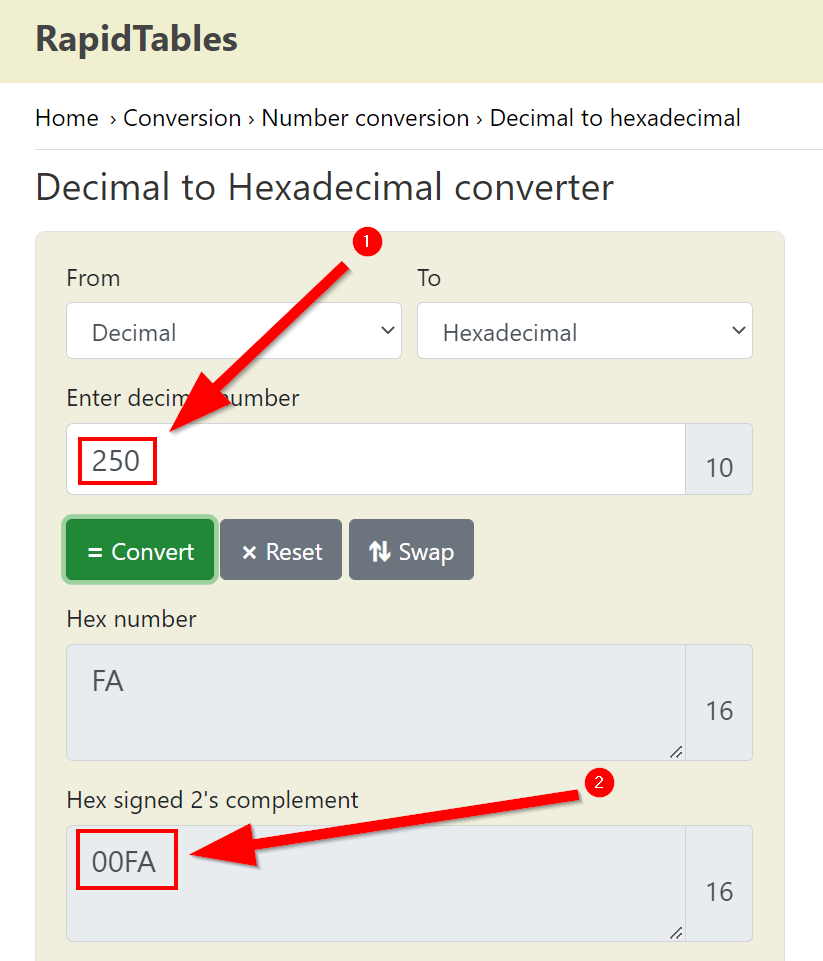
In this example, for 250ms the last four digits will look like this:
\x00\xFA
