

Question
I need to generate a TruCheck debug log to assist with troubleshooting my Webscan unit, how do I do this?
Answer
If using TruCheck version 3.03.64 or newer, the application can be configured to collect debug logs that can be used to troubleshoot issues.
Use the link below to download and install the newest version of TruCheck:
https://webscaninc.com/software-download/
With the new version of TruCheck installed, run the application and go to the Help section / Debug Information and place a check beside Save Before Verify.
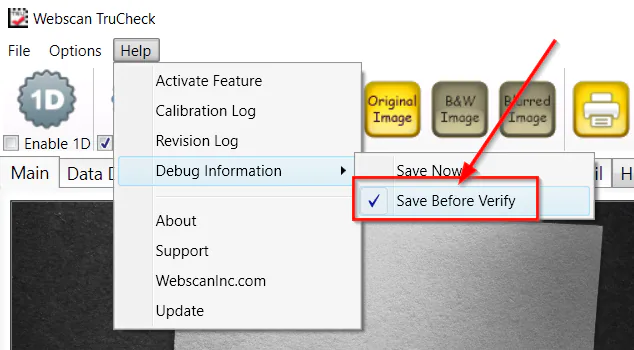
Use the system normally and attempt to verify a code. When it finishes or when the verify hangs you will find a file - debug.wdf - within the TruCheck data directory located here:
C:\ProgramData\Webscan Inc\TruCheck\
