

Details
In both old and new versions, you can see and adjust the Exposure and Gain from the image panel but there are also options for these settings not seen that can be accessed by the following methods:
Method 1: Newer Versions
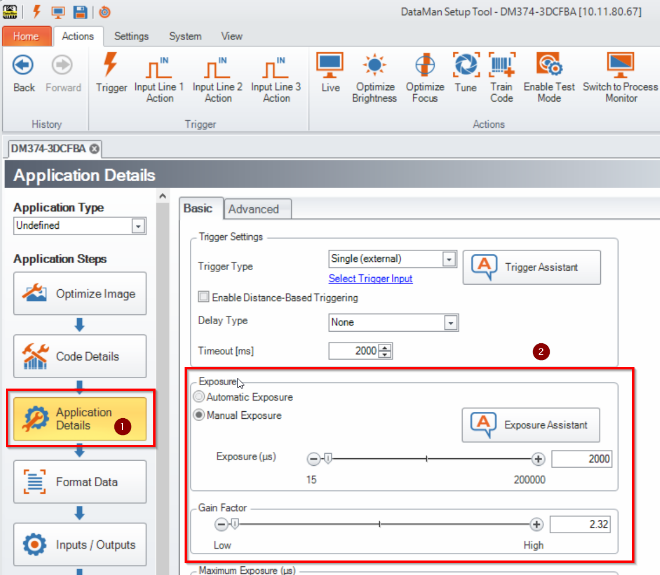
On the left-hand side of the DataMan Setup Tool, go to the Application Details section. Here the Exposure and Gain Settings can be found.
Method 2: Older Versions
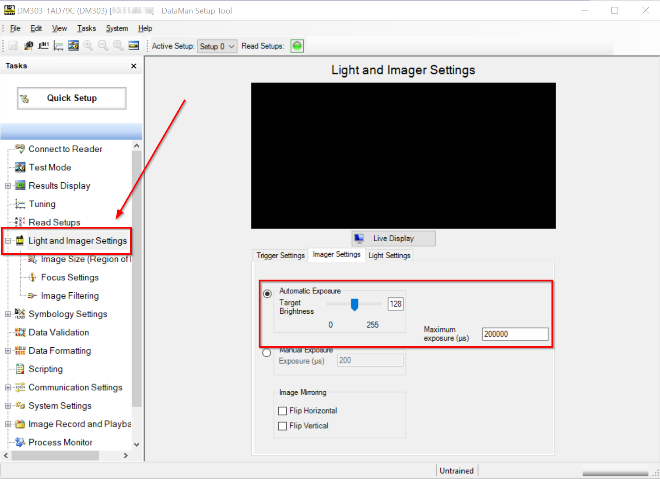
Go to the Light and Imager Settings on the left and click the light bulb (NOT the drop down). When on the next page, click on the Imager Settings tab.
Two additional settings are here that are not on the Image Panel method, these being the Maximum Gain and Exposure Settings. These are what they sound like and set a maximum exposure and gain, they are very helpful when you use Automatic Exposure and Auto Focus.
Reference:
Exposure: Measured in microseconds (1/1,000,000 seconds) controls how the light sensor will be reposed to the light for each image.
Gain: Digital contrast enhancement. Too low and there can be too little contrast, too much and your image will become grainy.
