

Details
Issue:
The Cognex device that is communicating over Profinet randomly disconnects from the PLC and then reconnects a few seconds later.
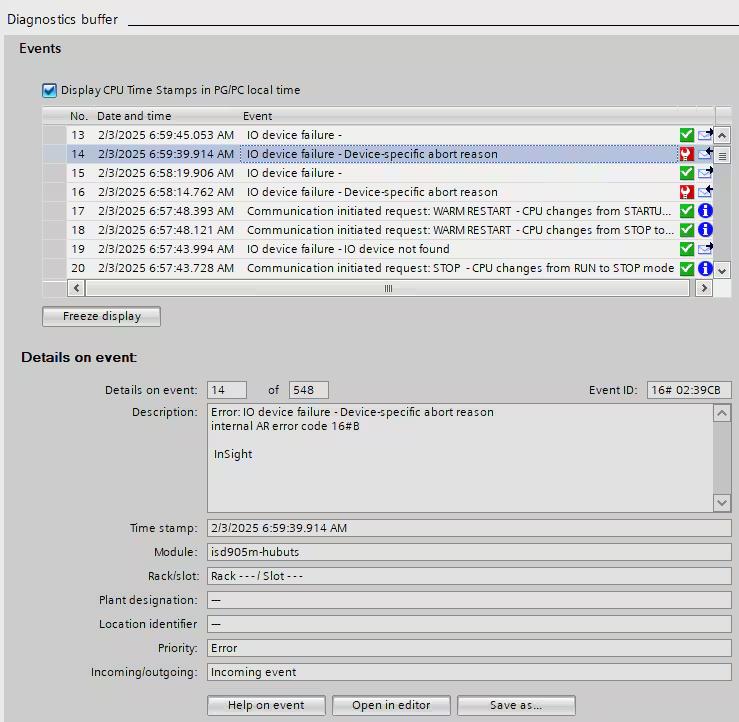
If you’re using Siemens TIA Portal for your PLC software, then similar entries to the below can be seen in the PLC Diagnostics Buffer:
Causes:
- The network and/or the Cognex device is too busy to answer the Profinet requests in time.
Resolution:
Any of the below might help reduce the frequency of the issue:
- increase the Profinet IO cycle time of the device in the PLC software
- increase the Profinet Watchdog time of the device in the PLC software
- use a 1000 Mbps switch instead of 100 Mbps switch
- use a properly configured QoS switch to prioritize Profinet packets
- reduce the number and/or size of images that the Cognex device sends to an FTP server
- keep the Cognex software connection to the device closed
- if the camera has multiple ethernet ports (i.e. IS3800 series) then separate the Profinet and other connections to run them on different ports
- Enable Traffic Control in the Industrial Ethernet Configuration of the Cognex device, if that option is available to you
Please note: When using Enable Traffic Control, user interface updates become slower.
